Are you considering advertising on YouTube and want to understand what drives its cost? In this article, you’ll learn how strategic budget planning can enhance campaign performance and turn your ad spend into a smart, results-driven investment.
Video advertising within the Google ecosystem has become one of the key channels for reaching users at every stage of the marketing funnel. YouTube offers massive reach, advanced targeting capabilities, and a flexible bidding and billing model. At the same time, many businesses ask a fundamental question: how much does advertising on YouTube actually cost, and how should the budget be planned to ensure the investment delivers measurable business value?
What Determines the Cost of YouTube Advertising?
There is no fixed price list for YouTube ads. The cost of advertising on YouTube depends on several factors that directly impact how much you actually pay for views or campaign outcomes. The most important ones include:
Bidding and billing model – you can pay per view (CPV), per 1,000 impressions (CPM), or per specific user action, such as a sign-up or purchase (CPA). Each model represents a different cost calculation logic.
Campaign objective – campaigns optimized for a specific action, such as conversions or leads (CPA), typically come at a higher cost than campaigns focused purely on reach or awareness (CPM).
Ad format – skippable in-stream ads, non-skippable ads, in-feed (YouTube search) ads, and Shorts ads all operate under different pricing dynamics. Generally, the more engaging and immersive the format, the higher the cost of reaching the user.
Target audience – targeting a narrow, high-value audience (e.g. a specific industry or decision-makers) usually results in higher bids compared to broad targeting.
Video quality and engagement – well-produced, compelling creatives that users are willing to watch can significantly lower the cost per view. Google Ads’ algorithm rewards high engagement and strong viewer signals.
Industry competition – if multiple advertisers are competing for the same audience, you should expect higher costs.
Seasonality and market pressure – during peak periods such as year-end, Black Friday, or major sales campaigns, increased advertiser demand drives higher prices.
In practice, the cost of YouTube advertising is driven primarily by the chosen strategy and campaign execution, rather than by budget size alone.
Example Benchmarks – What Budget Levels Should You Expect?
Below are indicative benchmark ranges based on recent market data. These figures are for reference only. Actual costs can be lower or higher depending on previously discussed variables such as campaign configuration, competitive pressure, audience targeting, and creative performance.
CPM – Cost Per Mille (cost per 1,000 impressions)
In-Stream & In-Feed ads: approx. $2–$6
YouTube Shorts ads: approx. $3–$8
B2B campaigns: approx. $6–$15
CPV – Cost Per View
Skippable In-Stream ads: approx. $0.01–$0.06
More competitive campaigns / precise targeting: up to approx. $0.15–$0.20
YouTube Shorts ads: approx. $0.10–$0.30
CPC – Cost Per Click
General campaigns (B2C, e-commerce): approx. $0.30–$1.00
Low to mid-ticket product purchase: approx. $10–$40
B2B campaigns
B2B lead (form, contact): approx. $20–$60
Qualified lead: approx. $50–$120
These benchmarks should be treated as directional guidance. Performance and cost efficiency ultimately depend on funnel design, audience quality, creative strategy, and optimization maturity.
Example Ad Formats – What are You Actually Paying for?
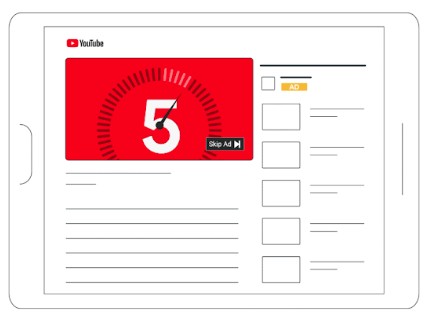
Skippable In-Stream ads appear before, during, or after videos, as well as in full-screen placements within the mobile app. Viewers can skip the ad after 5 seconds. Under the CPV bidding model, you are charged when a user watches 30 seconds of the ad (or the full video if it is shorter) or interacts with the ad. When using Target CPM, Target CPA, or Maximize Conversions strategies, charges are applied based on impressions rather than views.
Source: Google support
Non-Skippable In-Stream ads run up to 60 seconds and can appear before, during, or after a video. Viewers cannot skip these ads, and you are charged for every impression.
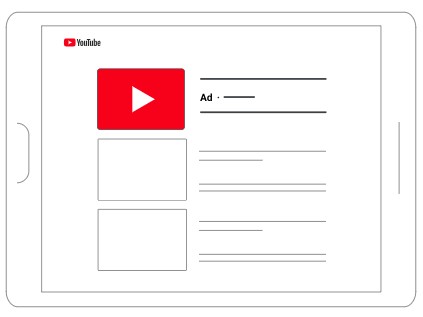
In-Feed Video ads feature a thumbnail and accompanying text. Their format and size adapt to the placement. Charges apply only when a user clicks to watch the video or, in certain cases, when the video auto-plays for at least 10 seconds.
Source: Google support
Bumper ads are non-skippable and have a maximum length of 6 seconds. They can appear before, during, or after a video, and you are charged for every impression.
YouTube Shorts ads are displayed in the same way as standard, organic Shorts. Costs are incurred based on impressions, TrueView ad views, or user interactions.
Source: Google support
How to Set a YouTube Advertising Budget
Your ad budget should be guided by your business objectives, not the other way around. A structured approach includes the following steps:
Define your campaign objective
Brand awareness and image: choose a reach-focused campaign.
Customer acquisition or lead generation: choose a conversion-focused campaign.
Remarketing: target users who are already familiar with your brand.
For campaigns aimed at sales or leads, focus on Cost Per Action (CPA) rather than just Cost Per View (CPV).
Establish a minimum scale
YouTube’s algorithm performs best when ads reach a sufficient audience size. Too small a budget can limit campaign effectiveness, even if individual views are inexpensive.
Test and optimize
It’s impossible to predict the most effective ad variant from the start. Allocate a portion of your budget to experimentation, such as:
different video lengths,
various calls to action (CTAs),
multiple audience segments.
Is YouTube Ads Worth it for Small and Medium-Sized Businesses?
YouTube advertising is not reserved for large companies with massive budgets. Thanks to flexible bidding options and precise audience targeting, ad costs can be adapted to fit the budgets of small and medium-sized businesses.
The key to success lies in campaign strategy. You must clearly define your objectives, set a realistic budget, and produce high-quality video creatives. Without these elements, even significant ad spend may fail to deliver the expected business results.
Summary
There is no single answer to how much YouTube advertising costs, as it depends on multiple factors: campaign objective, chosen ad format, competition level, and video quality. The advantage of YouTube, however, is the flexibility it offers in budget management and the ease of scaling campaigns, regardless of company size.
Advertising budgets should be determined based on data, testing, and a long-term marketing plan. With this approach, YouTube ad spend ceases to be just an expense and becomes a genuine investment in business growth.
A graduate of the AGH University of Science and Technology and the University of Economics in Krakow. At Delante since the SEM internship in August 2023.
In her free time, she is an enthusiast of watching ski jumping and exploring the culture of the Pieniny and Upper Silesia regions.
A graduate of the AGH University of Science and Technology and the University of Economics in Krakow. At Delante since the SEM internship in August 2023.
In her free time, she is an enthusiast of watching ski jumping and exploring the culture of the Pieniny and Upper Silesia regions.
FAQ
What are the YouTube billing models?
CPV (Cost Per View): you pay when a user actually watches your ad.
CPM (Cost Per Mille): you pay for every 1,000 ad impressions.
CPC (Cost Per Click): you pay for each click on your ad.
CPA (Cost Per Action): you pay for a specific action, such as a purchase or sign-up.
Do I need a large budget to advertise on YouTube?
No – even a smaller budget can deliver results if the campaign has a clear objective and is targeted to the right audience.
How to create videos that lower your cost of reach?
Produce engaging videos that capture attention in the first few seconds and include a clear CTA – YouTube’s algorithm rewards such content with lower delivery costs.