How to Promote Your Business Locally with Google Ads?

4min.

Comments:0

15 April 2025

Ads
How to Promote Your Business Locally with Google Ads?d-tags
Local Google Ads campaigns allow you to effectively reach users in your area. Learn how to run them to increase visibility and attract more customers.

4min.

Comments:0

15 April 2025

In digital marketing, a local Google Ads campaign is one of the most effective solutions for small and medium-sized businesses. With precise targeting and the use of advanced advertising tools, you can successfully reach customers in your area. If you’re wondering how to promote your local business with Google Ads, this article will help you discover the best strategies. You’ll learn how Google Ads works for local businesses and what key elements are crucial for success.

Choosing a Local Ad Campaign in Google Ads

Google Ads offers several campaign types, but for local promotion, the best options are:

  • Performance Max Local Campaigns – These automatically optimize ads for users near your business.
  • Search Network Campaigns with Local Targeting.
In both cases, it’s essential to set the target location – either as a radius around your business or specific cities or neighborhoods. This ensures ads reach people who can actually take advantage of your local offerings, increasing conversion chances because your ad is reaching those who can immediately use your services.

Performance Max Local Campaign

How to Set Up a Performance Max Local Campaign

  • Log in to Google Ads.
  • Click the “+” button to create a new campaign.
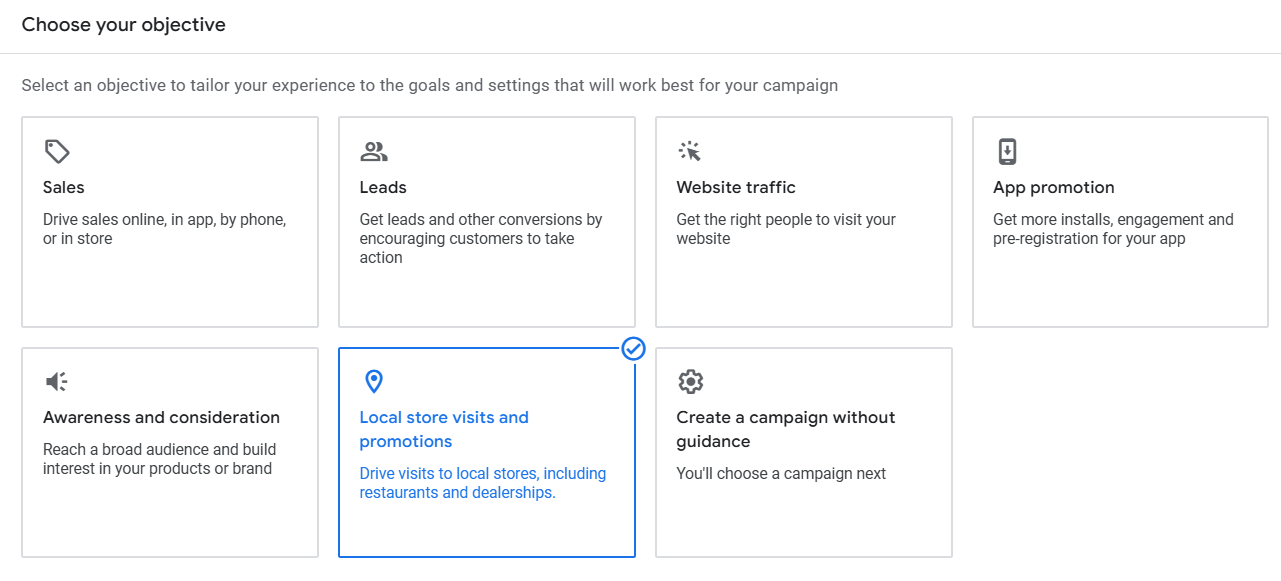
  • Choose the campaign goal: Local store Visits and Promotions.
How to Promote Your Business Locally with Google Ads?

Source: Google Ads panel.

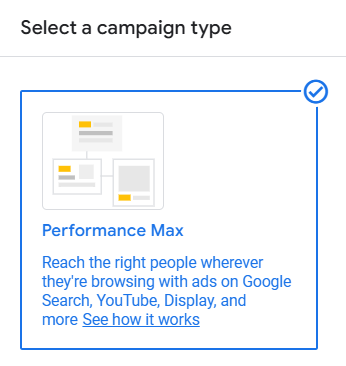
  • Choose the Performance Max campaign type (this replaces previous local campaigns).
Local Ad Campaign in Google Ads

Source: Google Ads panel.

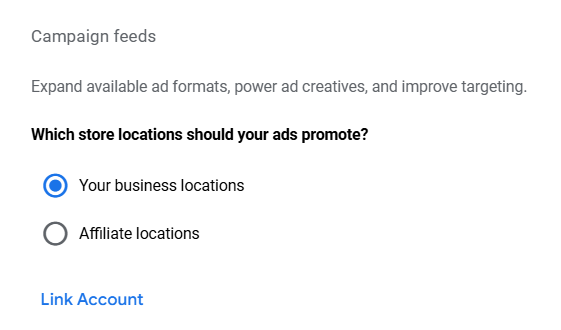
  • Connect Google Ads with your Google Business Profile (formerly Google My Business) – this allows Google to pull location data, business hours, reviews, etc.

For local ads to work properly, your Google Business Profile must be:

  • Verified – Google requires verification to prevent false locations and ensure the credibility of ads.
  • Up to date – Contact info, business hours, photos, and business descriptions should match the real-world details.
    Consistent with the ad campaign information – Inconsistencies may lead to campaign suspension.
Local Ad Campaign in Google Ads

Source: Google Ads panel.

Source: Google Ads panel.

  • Choose the rest of your campaign settings based on your preferences, but remember a few key elements that can significantly increase campaign effectiveness, including:
  • If you’re running e-commerce, you can create a classic local campaign with a product feed or use Local Inventory Ads (LIA), which allow you to promote product availability in local stores. With LIA, Google can display ads showing that products are available at your physical location, making it easier for customers to make a purchase decision.
  • Adjust the ad schedule to align with your business hours. For example, if you run a beauty salon open from 10:00 AM to 6:00 PM, there’s no point in displaying ads at 10:00 PM.
  • Add Call Assets (formerly known as Call Extensions) – this is an additional element that shows alongside your ad, encouraging users to take action.

Search Network Campaign with Local Targeting

Creating a search campaign with local targeting is not much different from a classic search campaign, but special attention should be paid to location settings, keywords, and the use of location extensions linked to your Google Business Profile.

Google Maps Ads

Google Maps is one of the most common places users look for local services – often literally “at the last minute.” With Google Ads, your business can appear at the top of search results in Maps, marked as a sponsored location.

Such ads are especially effective when the user is near your business or actively searching for services you offer. They stand out with:

  • your business name and rating,
  • address and business hours,
  • a Call or Directions button,
  • a photo or logo.

To have ads appear in Google Maps, you need to link Google Ads with your Google Business Profile and run a Performance Max campaign – this type of campaign uses Maps as one of its ad placements.

A well-optimized business profile and properly configured campaign can increase visibility at the crucial moment: when a customer is searching for a service “right now”.

Best Practices for Local Targeting

Optimizing Keywords

Local searches often include the name of the city or neighborhood. When adding keywords to your campaign, focus on phrases such as:

  • “Tailor in Los Angeles”
  • “Auto repair shop in Chicago”
  • “Dentist in New York Brooklyn”

Use Google’s Keyword Planner tool to find the best local phrases. Don’t forget to use long-tail keywords, which are less competitive but more specific, e.g., “best tailor in Los Angeles” or “quick auto repair in Chicago”.

Mobile Optimization

Currently, most users search for local businesses and services on their phones, often just before making a purchase decision. Therefore, it’s particularly important to optimize your ads for mobile devices.

Local ads should not only appear but also quickly grab attention – best with a short, clear message that works well on small screens. The first impression matters because mobile users often make decisions quickly.

What to keep in mind:

  • “Call Now” Button – perfect for local services. Many users prefer calling right away instead of navigating to a website.
  • Location Components – add address, map, business hours, and directions. Particularly important if you run a brick-and-mortar location.
  • Your mobile landing page should load quickly and have a simple, clear layout. Mobile users won’t wait or scroll through complicated content.

Ensure a Quality Google Business Profile

Even the best local campaign won’t succeed if your Google Business Profile is unattractive or outdated. Make sure it includes:

  • Consistent and complete contact details – address, phone number, business hours,
  • Professional photos of the premises, team, and products/services,
  • Regularly updated posts and promotions,
  • Customer reviews – and responses to those reviews,
  • Business description with relevant local keywords.

Promotions and Special Offers

Local users often look for discounts, promotions, and deals in their area. Google Ads is a great platform to highlight your special offers and encourage quick action.

Examples of effective offers:

  • “20% off your first visit”
  • “Free consultation for new clients”
  • “Limited-time promotion – only until the end of the month at local stores!”

Time-sensitive or limited-quantity offers often boost ad effectiveness. You can also highlight them with promotion extensions.

Test Different Ad Formats

Don’t limit yourself to just one type of ad. Local campaigns in Google Ads offer different formats, and testing them helps you find the most effective combinations:

  • Text ads – work great in search, especially for local queries.
  • Display ads – visually capture attention in Google’s display network; you can showcase products, store interiors, or logos.
  • Video ads – allow you to tell more, performing well in campaigns on YouTube or the Google Display Network.

Conclusion

Local ads for businesses in Google Ads are an effective strategy to reach customers in your area. The key elements include selecting the right Google Ads local campaign, precise targeting, keyword optimization, and regular analysis of results. If you want to learn more about using Google Ads to promote your local business, focus on testing different ad formats and adapting the strategy to the needs of your industry.

With effective local advertising on Google Ads, you can increase your business visibility and attract more customers!

Want to promote your business locally effectively? Contact us, and we’ll help you create a successful campaign!


Author
Karolina Pyznar - SEM Specialist
Author
Karolina Pyznar

SEM Specialist

A Management and Economics graduate. She started her adventure at Delante with an SEM internship in December 2021. She currently holds the position of SEM Specialist. Her special interest from the professional angle is Internet marketing, and she is no stranger to Google market changes. Privately, she enjoys traveling, sport, especially gym.

Author
Karolina Pyznar - SEM Specialist
Author
Karolina Pyznar

SEM Specialist

A Management and Economics graduate. She started her adventure at Delante with an SEM internship in December 2021. She currently holds the position of SEM Specialist. Her special interest from the professional angle is Internet marketing, and she is no stranger to Google market changes. Privately, she enjoys traveling, sport, especially gym.