
Measuring the Effectiveness of Facebook Campaigns with UTM Parameters

4min.

Comments:0

24 September 2025

Ads
Measuring the Effectiveness of Facebook Campaigns with UTM Parametersd-tags
Learn how to measure the effectiveness of your Facebook campaigns with UTM parameters. Discover what they are, why they matter, and how to analyze results in Google Analytics 4.
Ads

4min.

Comments:0

24 September 2025

In the world of digital marketing, every click matters. Businesses invest in Facebook Ads campaigns to increase visibility, attract new customers, and drive sales. But how can you measure whether these Facebook Ads campaigns are truly delivering the expected results? The statistics available in Ads Manager alone are often not enough—we need a tool that allows us to track the source of traffic and measure the performance of individual campaigns. This is where UTM parameters come in. With them, we can not only see how many users landed on a website from a Facebook ad, but also analyze which creatives, target audiences, or content formats actually convert.

What Are UTM Parameters in Meta Ads?

UTM parameters (Urchin Tracking Module) are additional tags appended to URLs. They act as labels that allow analytics tools like GA4 to identify where a website visitor comes from. With these parameters, you can specify, for example:

  • Campaign source – e.g., facebook
  • Campaign medium – e.g., cpc
  • Campaign name – e.g., september_2025
  • Campaign content – e.g., utm_content=video, utm_content=image
  • Other custom parameters, defined by you – for example, to mark specific A/B tests or audience segments

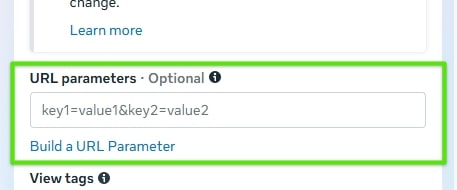
In Meta Ads, you can add these in the “URL Parameters” section when creating an ad.

URL parameters in Meta Ads

source: Meta Ads Panel

It’s important to note that using UTMs does not affect how the website or the ad itself functions—it only improves how traffic is analyzed in your analytics tools.

Why Use UTMs in Facebook Campaigns?

UTMs don’t impact ad delivery or optimization in Meta, but they are essential for analytics tools like Google Analytics 4 or other tracking systems.

One of the most common issues with analyzing Facebook traffic is that, without UTMs, all visits in GA4 are grouped together under “facebook.com.”

The biggest benefit of UTMs is the ability to better understand the user journey. Facebook Ads Manager provides click and conversion data, but it doesn’t always reveal what happens afterward. UTMs let you precisely track user behavior on your site—how much time they spent, which pages they visited, and whether they took further desired actions.

Many businesses run campaigns simultaneously across Facebook, Instagram, Google Ads, and newsletters. Without UTMs, it would be nearly impossible to identify which source delivers the highest-quality traffic. With UTMs in place, you can compare results in GA4 and determine which channels perform best.

UTM parameters also help optimize ad spend. When you see which campaign or creative is driving valuable conversions, you can allocate more budget there while pausing underperforming ads. This means real cost savings and more effective marketing actions.

Another benefit is resolving discrepancies between Facebook data and Google Analytics—differences in attribution models or session counting are less problematic when traffic is tagged consistently.

How to Create Facebook UTMs?

Effective Facebook campaign tagging starts with a consistent approach. From the beginning, it’s best to establish clear rules:

  • Avoid mixing uppercase and lowercase letters (e.g., “Facebook” vs. “facebook”),
  • Avoid spaces and special characters,
  • Stick to one naming convention.

This ensures your GA4 reports stay clear, easy to analyze, and consistent across campaigns.

For Facebook Ads, the most common tagging setup is:

  • utm_source=facebook
  • utm_medium=cpc
  • utm_campaign=campaign_name
  • and for creative tests: utm_content=ad_version
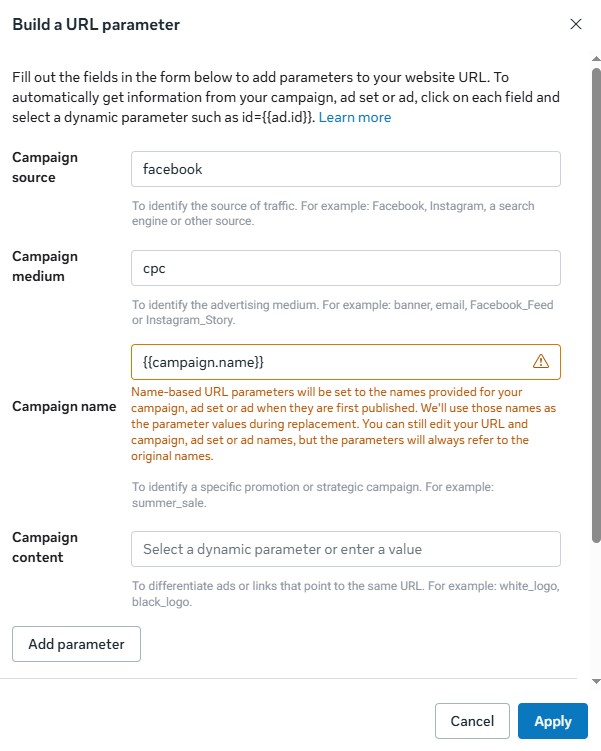
Building a URL parameters in Meta Ads

source: Meta Ads Panel

You can create parameters manually or use tools like Campaign URL Builder. In that case, you’ll need to paste the tagged URL manually into the “Website URL” field.

For larger ad volumes, it’s worth automating this process in Meta Ads. Dynamic placeholders such as utm_campaign={{campaign.name}} or utm_content={{ad.name}} ensure the system automatically inserts the correct values. This saves time, reduces the risk of errors, and ensures every creative is tagged properly. As a result, your GA4 data is more complete and enables deeper performance analysis.

UTM parameters in a URL link

source: Meta Ads Panel

How to Track Facebook (Meta) Campaign Results in Google Analytics 4?

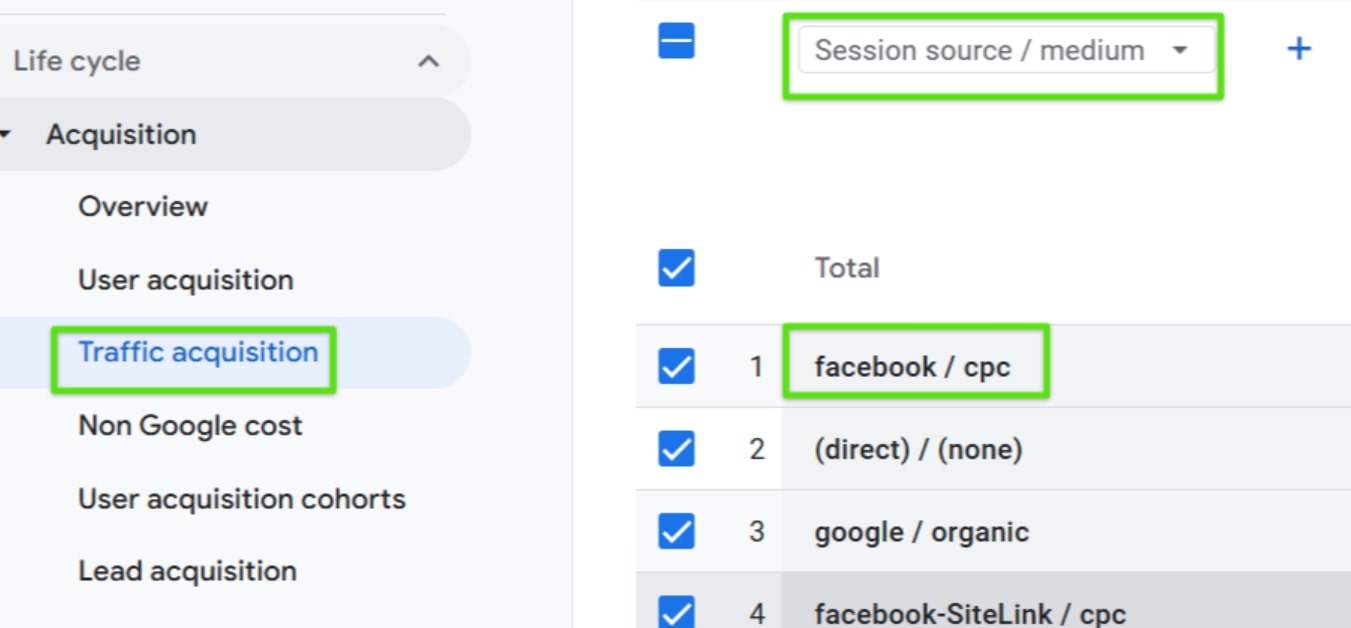
Once your links are properly tagged, it’s time to analyze the data in GA4. The best place to start is the Traffic Acquisition report, which shows you which sources and mediums bring users to your site. Thanks to UTMs, you can easily distinguish Facebook campaigns from other marketing activities.

UTM parameters in Google Analytics 4

source: Google Analytics 4 Panel

The User Acquisition report then lets you check how effectively your campaigns attract new users who haven’t interacted with your site before.

The Explorations module provides even greater capabilities. It allows you to combine dimensions and metrics to analyze, for example, how different ad sets vary in terms of session duration or conversions. This tool enables you to dive into details and extract actionable insights that are harder to spot in standard reports.

When analyzing results, it’s important to focus not only on the number of sessions or clicks but also on traffic quality. Time on site, engagement rate, or the number of completed goals (e.g., purchases, newsletter sign-ups) are signals that show whether an ad truly fulfills its purpose. It’s also valuable to compare these results with costs reported in Ads Manager to calculate the real cost per conversion.

Summary

UTM parameters are one of the simplest tools for measuring the effectiveness of Facebook campaigns in GA4. They not only help distinguish paid from organic traffic but, more importantly, reveal which campaigns, ads, and audiences actually deliver results.

Implementing UTMs doesn’t require much effort but can significantly improve your analytics and reporting processes. That’s why it’s worth establishing consistent naming conventions, testing links before launching campaigns, and regularly analyzing GA4 data.

Still, UTMs are not a silver bullet. In practice, a large portion of Meta Ads traffic may still be classified in GA4 as “direct” or even “organic,” which distorts reports.

For this reason, the best practice is to evaluate performance from two perspectives—through analytics tools like GA4 and directly in Ads Manager. While Meta’s dashboard tends to “inflate” performance (e.g., attributing conversions to ad impressions due to its attribution model), it remains the most reliable source of truth about how campaigns are actually performing.

Author
Karolina Pyznar - SEM Specialist
Author
Karolina Pyznar

SEM Specialist

A Management and Economics graduate. She started her adventure at Delante with an SEM internship in December 2021. She currently holds the position of SEM Specialist. Her special interest from the professional angle is Internet marketing, and she is no stranger to Google market changes. Privately, she enjoys traveling, sport, especially gym.

Author
Michał Szydłowski - Junior SEM Specialist
Author
Michał Szydłowski

SEM Specialist

Graduate of Marketing and Communication at the Cracow University of Economics. He started working at Delante in 2023. Privately, he is interested in traveling and discovering new music, as well as enjoys watching a good thriller and a football game.

Author
Karolina Pyznar - SEM Specialist
Author
Karolina Pyznar

SEM Specialist

A Management and Economics graduate. She started her adventure at Delante with an SEM internship in December 2021. She currently holds the position of SEM Specialist. Her special interest from the professional angle is Internet marketing, and she is no stranger to Google market changes. Privately, she enjoys traveling, sport, especially gym.

Author
Michał Szydłowski - Junior SEM Specialist
Author
Michał Szydłowski

SEM Specialist

Graduate of Marketing and Communication at the Cracow University of Economics. He started working at Delante in 2023. Privately, he is interested in traveling and discovering new music, as well as enjoys watching a good thriller and a football game.

FAQ

Do UTM parameters directly affect ads?

No, UTM parameters in Facebook campaigns do not change how ads work or how they are displayed. They are simply link labels that help analyze traffic later in Google Analytics or other tools. A user clicking the ad won’t notice any difference, but for a marketer, they’re extremely useful in evaluating campaign effectiveness.

What do Facebook UTMs provide?

UTM parameters allow you to precisely identify the source and nature of traffic. They help determine which campaigns and ads generate valuable visits, distinguish paid traffic from organic, and compare Facebook with other channels. It’s a simple tool that makes decision-making easier and more data-driven.