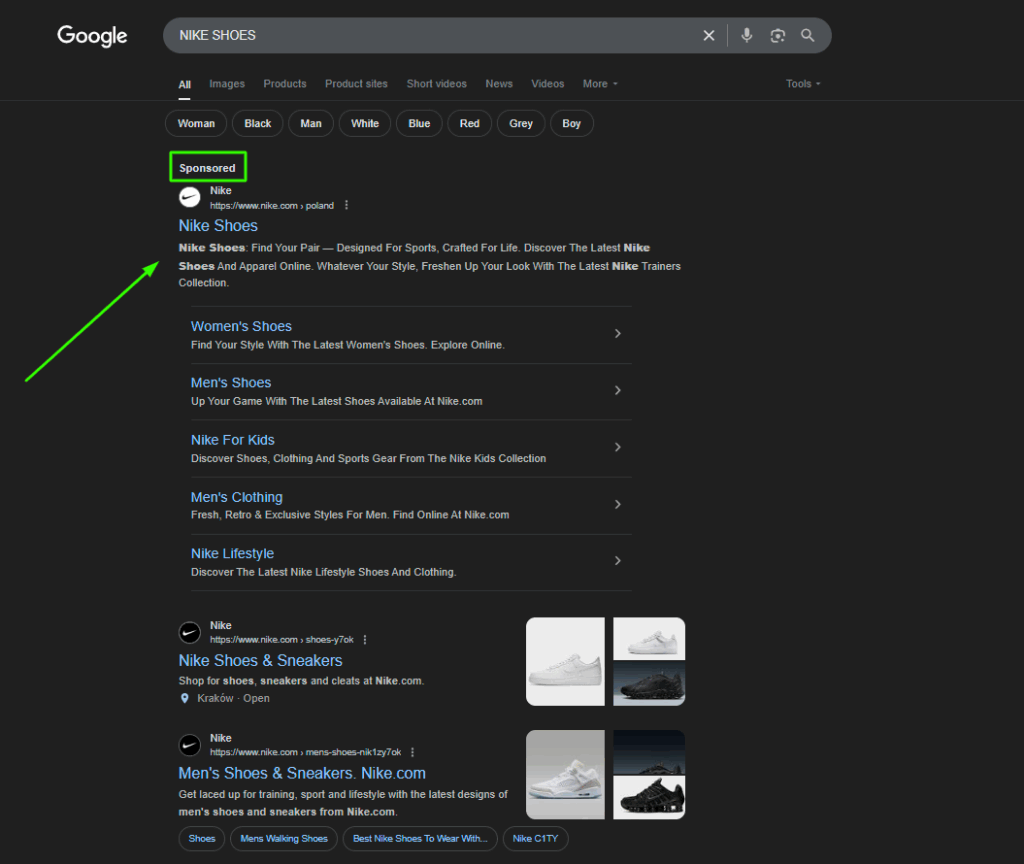
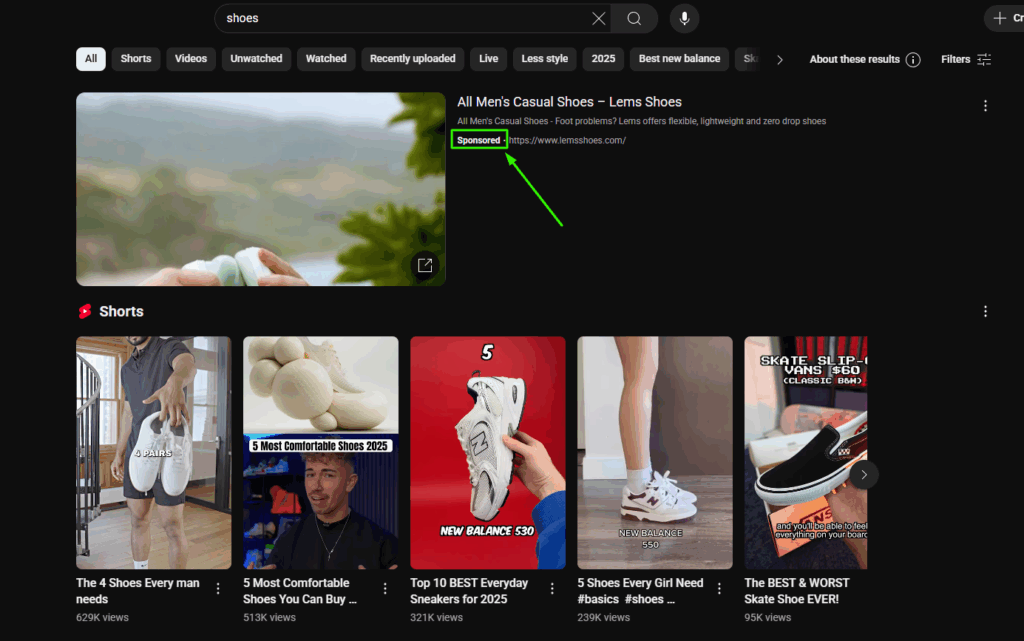
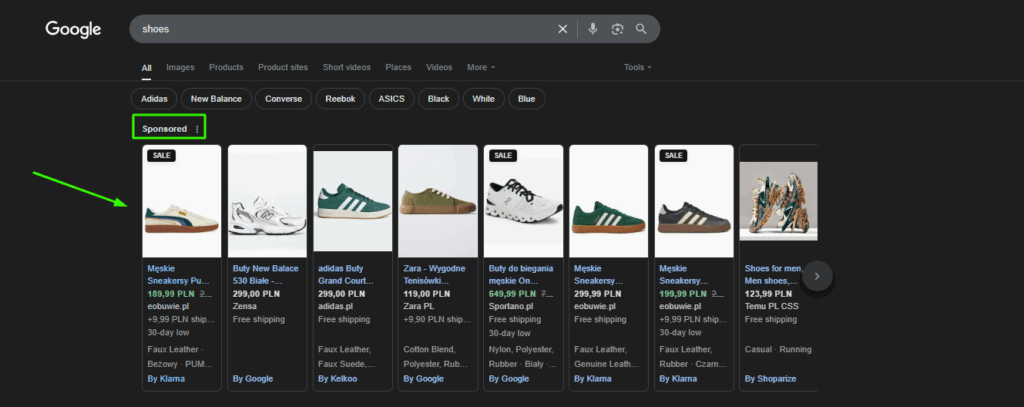
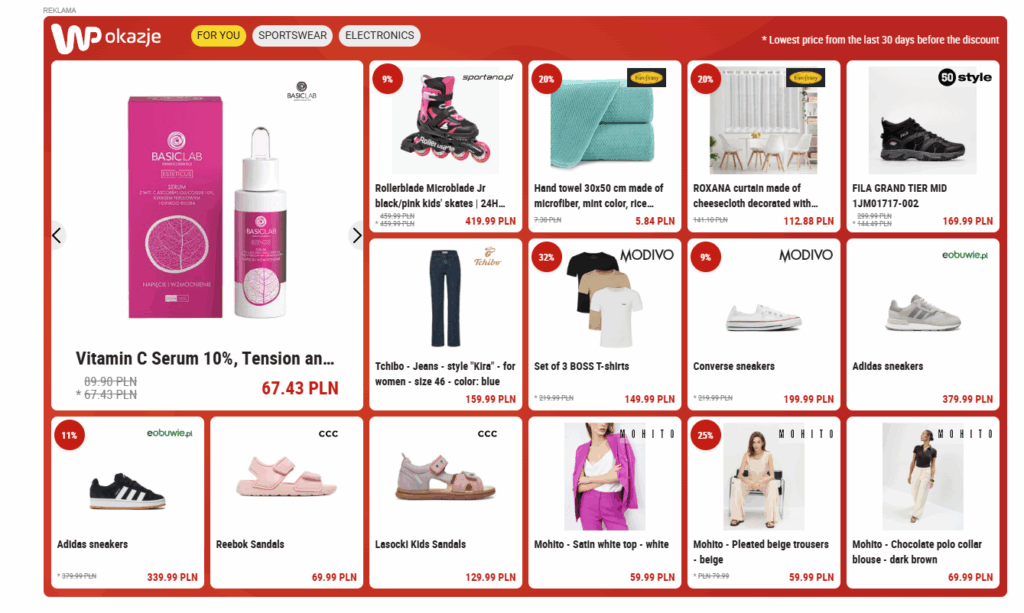
Here we'll explain what Google Ads are, show their display possibilities, discuss their features and business applications. Also, we'll present Ads technical terms and describe the most popular types of campaigns.
Google Ads is Google’s online advertising platform that allows businesses to display text ads, product listings in Google Search, visual ads across the Display Network, video ads (such as on YouTube), app promotion ads, and remarketing campaigns. This makes it possible to run cohesive advertising efforts across different stages of the customer journey. Ads on Google are delivered through an auction system, where advertisers compete for placement in Google’s search results and other Google-owned properties. The platform combines broad reach with highly targeted ad delivery.
Creating a Google Ads account is free. However, displaying ads involves costs based on your selected campaign strategy and budget (you can learn more about ad spend in our article on how much Google Ads costs). To begin advertising, you need to set up and configure a free account on the platform. From there, the focus shifts to ongoing optimization to better align with your business goals.
How does Google Ads work?
You might be wondering how the system works and what exactly you’re paying for. Google Ads operates on a PPC (Pay-Per-Click) model, meaning you only pay when someone clicks on your ad. In other words, you’re charged only when a user actively engages by clicking and visiting your site—not just for the ad being shown. This gives you full control over your budget, ensuring that you’re paying for actual interest in your offer.
By now, you know that Google Ads is a powerful platform that helps businesses promote their products or services across Google’s vast ecosystem. You also understand the billing model. Now, let’s take a closer look at the mechanisms and algorithms that power Google Ads and determine its effectiveness. To learn how to properly set up a campaign, it’s important to first understand how Google matches ads to user search queries.
Google Ads uses an auction system where advertisers bid for placement in the Google Search results. Which ad appears is determined by several factors, including the bid amount (your max cost-per-click), ad quality, landing page experience, ad relevance, use of ad assets (previously called extensions), and the competitive landscape of the auction. For more detailed info, visit Google’s official support page: Google Ads Auction Guide.
A key component in this system is Quality Score, which considers your landing page experience, ad relevance, and expected click-through rate (CTR). A higher Quality Score can reduce your cost-per-click (CPC) and improve your ad position. That’s why it’s essential to invest both in Google Ads services and SEO services as well—making sure your website is fast, user-friendly, and search engine-optimized helps improve both organic and paid visibility.
What types of ads are available in Google Ads?
Google Ads offers a wide range of advertising options tailored to various marketing goals, target audiences, and digital touchpoints. Advertisers can choose from several campaign types and ad formats, each differing in where the ads appear, how the message is delivered, and how users engage with them.
Some of the most common types and formats of Google Ads include:
Text ads in the Search Network – These ads appear as text-based results triggered by specific keywords and are typically displayed above or below the organic search listings on the Google Search results page (e.g., near the bottom of page one).
Display ads in the Google Display Network (GDN) – These are visual banner ads that appear on websites, mobile apps, and platforms that partner with Google. Display ads allow you to reach a broad audience outside of Google Search—for example, on popular U.S. sites like ESPN.com, Weather.com, or BuzzFeed. This format is ideal for building brand awareness, retargeting previous visitors, or supporting upper-funnel campaigns.
Video ads (YouTube) – These are short video spots that appear before, during, or after other videos on YouTube, as well as across Google’s video partner sites. With their engaging visual and audio format, video ads are highly effective at capturing attention and can be precisely targeted to specific audience segments based on interests, demographics, or behavior.
Shopping ads – These ads showcase specific products directly in Google Search, complete with an image, price, product title, and store name. They allow users to quickly view and compare offers, and click through directly to the purchase page. Shopping ads are particularly powerful for e-commerce businesses looking to drive high-intent traffic.
Remarketing ads – These ads target users who have previously interacted with your website, whether they visited a product page, added an item to their cart, or made a purchase. Remarketing campaigns can run across both the Search Network and Display Network, helping you re-engage potential customers and guide them back into the conversion funnel.
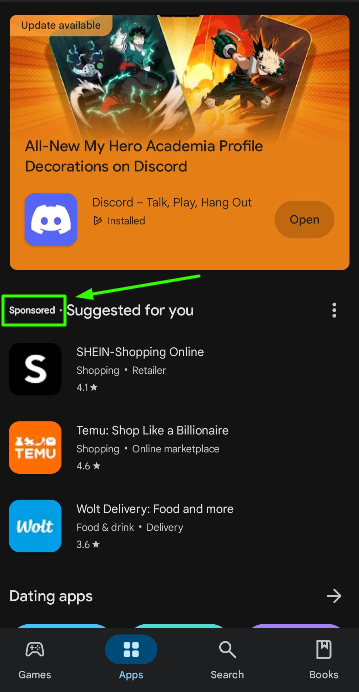
App promotion ads – These ads are designed to increase app installs and user engagement. They can appear in Google Search (with a “Download App” call to action), across the Display Network, on YouTube, within Gmail, or even inside other mobile apps. Google uses automation to optimize placement, creative, and bidding based on your goals.
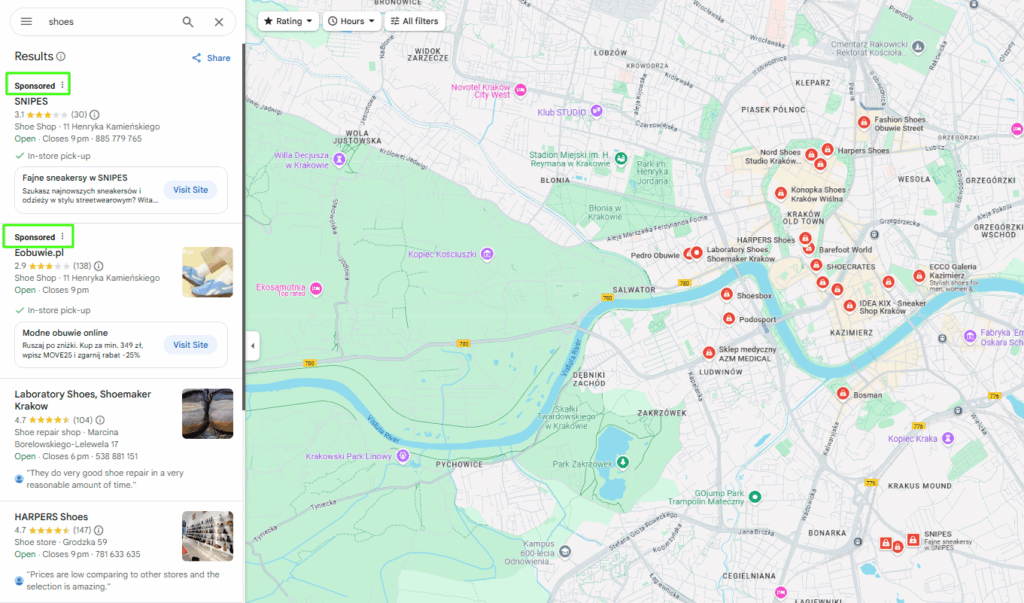
Local ads in Google Maps – These ads help businesses stand out on Google Maps, driving foot traffic from nearby users. They’re ideal for physical locations looking to attract local customers, highlight business hours, or promote in-store offers directly on the map interface.
Key factors that influence the effectiveness of a Google Ads campaign
To get the most out of your Google Ads campaigns, it’s essential to go beyond simply selecting an ad type. Success also depends on smart keyword selection, precise targeting using demographic and location data, and effective use of ad assets. Together, these elements ensure your message reaches the right people at the right time – maximizing both impact and return on ad spend.
Ad assets (components)
Ad assets, formerly known as ad extensions, are additional elements that can appear alongside your Google Ads to enhance their visibility, relevance, and usefulness. These assets may be clickable or non-clickable and help improve user engagement and ad performance. Available assets include:
Sitelinks (links to specific pages on your website)
Image assets (custom visuals to complement your message)
Business logo
Business name
Phone number (note: phone numbers must be added as a dedicated asset and cannot be placed in ad headlines or descriptions)
Callouts (short snippets highlighting unique offers or features)
Structured snippets (predefined formats to showcase product categories or services)
Location info (helps users find your physical business on Google Maps)
Keywords are the terms advertisers select during campaign setup to trigger ad visibility for relevant user searches. Ads are shown when users type queries in Google Search that match or relate to the chosen keywords.
However, keyword targeting isn’t just a simple match—there are multiple keyword match types that define how closely a user’s search must align with the keyword for the ad to appear. These include broad match, phrase match, and exact match, each offering different levels of reach and precision.
It’s also important to note that Shopping campaigns and Dynamic Search Ads (DSAs) don’t rely on manually chosen keywords. Instead, Google automatically matches ads to relevant search queries based on your product feed or website content, allowing for a more automated and content-driven approach.
Geotargeting (location targeting)
Geotargeting lets advertisers control where their ads are shown based on geography. You can target broad areas like countries or regions, or narrow locations such as specific cities, zip codes, or even a radius around a store. This helps businesses focus their budget on the most relevant geographic markets and avoid wasting ad spend on areas outside their service zone or customer base.
Demographics
Demographic targeting enables advertisers to tailor their campaigns based on attributes like age, gender, and, in select countries such as the United States, household income. This ensures your message reaches audiences who are more likely to engage or convert, improving campaign efficiency and relevance. Combined with interests and behaviors, demographic filters are a powerful way to refine your audience and increase ROI.
Why advertise with Google Ads? Discover the benefits
There are many reasons why advertising with Google Ads is a smart investment, but the most important advantages include: wide reach, precise audience targeting, cost control, fast results (your ads go live as soon as the campaign is launched), and easy performance tracking. These features make Google Ads an effective tool for businesses looking to drive measurable outcomes across the digital landscape. For a more in-depth look at the benefits, check out our article on the advantages of Google Ads.
Prohibited and restricted products in Google Ads
While Google offers a robust platform for promoting products and services online, there are strict policies about what can and cannot be advertised. Certain categories are outright prohibited, while others are subject to country-specific restrictions and certifications. Below is a summary of the content that cannot be promoted through paid Google campaigns:
Prohibited content
Counterfeit products – Items that imitate brand-name goods
Dangerous products and services – Including illegal drugs, psychoactive substances, drug paraphernalia, weapons, explosives, ammunition, or instructions on how to make harmful or explosive materials
Enabling dishonest behavior – Such as hacking tools, services for cheating on exams, or creation of fake documents
Hate speech and violence – Content promoting hatred, intolerance, discrimination, or violence
Offensive language – Ads using vulgar or profane wording
Adult content
Google may allow adult-related ads depending on factors like user age, legal regulations, and search intent. However, many categories are heavily restricted or partially limited, including:
Full nudity
Dating services explicitly for sexual encounters
Partial nudity
Sexually suggestive dating
Cosmetic procedures on intimate body parts
Adult entertainment (e.g. strip clubs, adult video games, erotic festivals)
Alcohol
Ads promoting alcohol products or brands are only allowed in selected countries. In the U.S., such ads are permitted under certain guidelines; in some countries (like Poland), they’re fully prohibited.
Gambling and betting
Advertising gambling-related content requires Google certification and is allowed only in specific countries. Restricted categories include:
Online casinos
Lotteries
Sports betting, poker, bingo, and other games of chance
Healthcare and medicine
Advertising healthcare-related content also requires special certification—and even then, there are strict limitations. Google prohibits:
Selling prescription drugs without a valid prescription
Promoting unapproved substances
Advertising opioids (allowed in some regions under strict conditions)
Promoting unproven or experimental medical treatments
Additionally, depending on the region, ads may not be allowed for:
Clinical trial recruitment
At-home HIV tests
Abortion services
Birth control
Addiction treatment services
Pharmacies and medication sales
Political content
Political ads are allowed, but must comply with all local election advertising laws and transparency requirements. Verification may be required in advance of campaign launch.
Financial services
Advertising financial services is subject to strict restrictions. Some areas that require additional scrutiny or certification include:
Cryptocurrency-related products and services
Investment advice or platforms
Personal financial planning or crypto advisory services
Always review Google Ads’ Advertising Policies before launching a campaign, especially if your business operates in a regulated industry. Violations can result in disapproved ads or account suspension.
What should you know before launching a Google Ads campaign?
Before you dive into your first Google Ads campaign, remember this: advertising on Google should be viewed as an investment, not an expense. Simply setting up a campaign, launching it, and hoping for results isn’t enough. Success starts with a well-thought-out strategy.
Ask yourself these key questions to build the right foundation:
What do you want to achieve with your campaign? Are you aiming for phone calls, leads via contact forms or email, e-commerce sales through a shopping cart, YouTube views, or increased brand awareness for a new product or service?
What is the state of your industry? How competitive is it? Identify your biggest competitors. Are they running Google Ads? If so, what types of campaigns are they using? Without understanding the competitive landscape, you can’t effectively stand out.
Which products or services are most important to your business? What unique selling points (USPs) or product details can be highlighted in your ads?
What makes your offer better than the competition’s? Focus on what sets your business apart—this could be price, quality, customer service, speed of delivery, or something else entirely.
Where should your ads be shown? Define your geographic targeting: country, state, city, ZIP code, or even specific neighborhoods.
Who is your ideal customer? Build a buyer persona that outlines your target audience’s age, gender, location, education level, household income, lifestyle, devices used, and awareness of your brand. The more specific, the better—precise targeting leads to more effective campaigns.
What keywords should trigger your ads in both Search and Display Networks?
What is your monthly ad budget? Your budget determines how many campaigns you can run and which formats are realistic. If your budget is limited and the industry is competitive, focus on one high-performing campaign type. With more flexibility, you can combine formats (e.g., Search + Shopping + Remarketing) for greater impact.
Best practices for Google Ads campaigns
Now that you understand what Google Ads is and which ad formats are available, let’s look at actionable steps that can help improve your campaign results.
Strategic planning is key
As mentioned above, don’t start without a strategy. Set clear goals, define your budget, target audience, and keywords. These fundamentals are crucial to effective campaign management.
Use precise keywords
Avoid overly broad keywords, especially in broad match types. Broad keywords may lead to irrelevant clicks and wasted budget. Focus on intent-driven, specific keywords that closely match your offer.
Align ads with search intent
Every search query reflects a user’s intent—your ad should directly address that. Write a compelling ad copy that clearly explains what users can expect and why they should click. Make sure the message aligns with the keyword and encourages interaction. The better your intent match, the higher your CTR and conversion rate.
Focus on your Quality Score
Your Quality Score—Google’s rating of the relevance and quality of your ad, landing page, and expected CTR—affects your ad position and cost-per-click. A high score means better placement and lower costs. Don’t ignore it—it’s one of the most important success metrics in Google Ads. (We’ve dedicated an entire article to improving Quality Score.)
Analyze and optimize constantly
Track your campaign performance regularly using key metrics like:
Click-through rate (CTR)
Number and value of conversions
Cost-per-click (CPC)
Cost per conversion
Data-driven insights will help you optimize your targeting, keyword choices, ad creative, and bidding strategies.
Now that you’ve gone through this complete Google Ads guide, you know why Google is a smart platform for digital campaigns. Take advantage of its full potential by defining your business goals and selecting the right campaign types to meet them. Ensure your offer shows up at the right time, in the right place—right in front of your ideal customer.
And remember: your competitors are already there.
So, are you ready to manage your campaigns yourself, or would you rather work with our experienced SEM team at Delante? Either way, we’re here to help contact us when you’re ready.
A Management and Economics graduate. She started her adventure at Delante with an SEM internship in December 2021. She currently holds the position of SEM Specialist. Her special interest from the professional angle is Internet marketing, and she is no stranger to Google market changes. Privately, she enjoys traveling, sport, especially gym.
A Management and Economics graduate. She started her adventure at Delante with an SEM internship in December 2021. She currently holds the position of SEM Specialist. Her special interest from the professional angle is Internet marketing, and she is no stranger to Google market changes. Privately, she enjoys traveling, sport, especially gym.


 d-tags


 Loading...