

 d-tags


 Loading...
1. Slow-loading website
Many industry studies show that loading speed significantly reduces conversion rates. No one likes to wait, and this comes as no surprise. Especially on the internet, we are used to visiting a website and having the content load in a fraction of a second. A few seconds of waiting is already a flashpoint that usually ends in user frustration and abandonment of the site.
How quickly do users give up waiting? On average, it takes 2.75 seconds to leave a website and choose another one from the search results. This means that in terms of retaining users and leading them to the conversion process, the loading time of a website is crucial – it is the first point of contact between a potential customer and your website! If you don’t provide a good experience at this stage, the user won’t even get to see your offer.

Source: nitropack.io
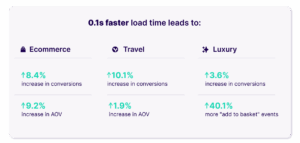
Here is some data to illustrate the scale of page speed’s impact on conversion. Team NitroPack, in collaboration with Google, conducted research showing that improving page load time by just 0.1 seconds can lead to conversion increases of up to 10.1% in the travel industry, 8.4% in e-commerce, and 3.6% in the luxury industry. The research report indicated (1) that the most important factor for monitoring and improving this problem is Core Web Vitals, which we will discuss in more detail in a moment.
Source: nitropack.io
How to interpret Page Speed Insights results and what is actually useful?
When we think about diagnosing website speed issues, the first tool that usually comes to mind is Page Speed Insights. We look at the circle with a performance score from 0 to 100, and if it’s green, we’re happy. At this point, a disclaimer: classic PSI results are absolutely irrelevant!
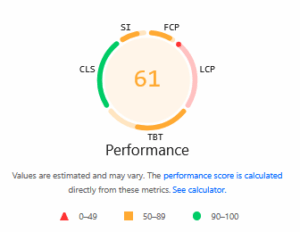
What will really matter are the indicators below, namely Core Web Vitals:
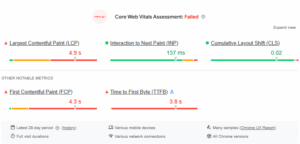
Why is it worth looking at these indicators? These results are based on real user visits to your website, and the aforementioned circle with a score from 0 to 100 is a single test at a given moment. After all, the point is not to do well in tests, but to ensure that users are not annoyed by slow loading times when visiting your website.
To verify Core Web Vitals results, I recommend another free tool from Google: https://cruxvis.withgoogle.com/. There, you can ascertain CWV over time and easily switch between metrics or, for example, device types. This certainly gives you a broader view of the data than the Page Speed Insights report.
How to fix Core Web Vitals issues on your website?
Have you checked your website and found that the results are not the best? The problems can be very different, but below I have listed a few that I have encountered most often in my career:
- Slider on the home page. This element can significantly slow down the website, and the user will usually scroll down before the slide changes anyway. I recommend testing the removal of the slider and performing another CWV audit after some time.
- Old and unnecessary plugins and add-ons. Especially for WordPress, thoroughly review all installed extensions. You will likely find things there that you haven’t used in a long time and which, due to a lack of updates, are slowing down the website.
- Photos are in the wrong format and size. This is a widespread mistake – you have high-quality images and want them to look just as great on your website. You can achieve the same effect without adding 4000×3000 px graphics to your website.
- Unnecessary JS code. When optimizing page loading speed, we should follow the principle of less is more. If you use a lot of JS on your website, e.g., for various visual effects, consider whether it is really necessary and whether it adds value to users. If not, reduce JS use.
- Instant loading of all elements on the page. If your website has extensive content and many multimedia elements, consider lazy loading. This technique allows the most critical components to be loaded first, followed by the rest, e.g., those located lower on the page. This allows the user to quickly see the page’s initial view while the lower elements load in the background.
- Server-side problem. Sometimes everything on the page may be fine, but the server may not be able to handle the load. If you decide that the server is affecting page load time, I recommend a change, especially if you are aiming to attract more traffic.
At Delante, we can help you speed up your website! Contact us, and we will be happy to conduct a CWV audit, find the source of the problem, and improve the user experience.


