Meta is introducing an update for Leads and Sales campaigns that affects how audience targeting is set up. Now, all Advantage+ options are enabled by default, meaning the system will automatically optimize targeting using AI. If you prefer manual audience settings, you’ll need to activate them in a new way.
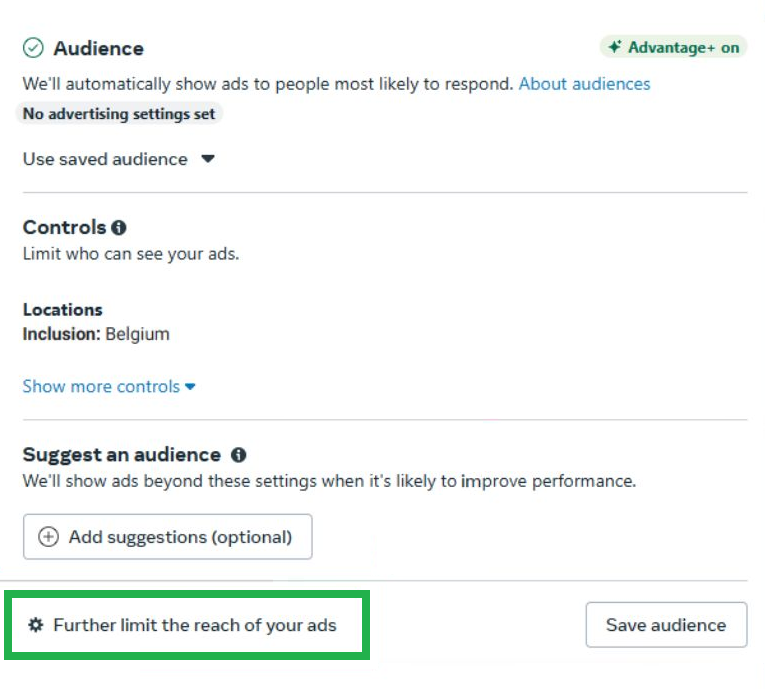
source: Meta Ads Panel
To do this, go to the Ad Set level, navigate to the Audience section, and click the gear icon labeled Further limit the reach of your ads. After enabling this option, Meta will display a warning about potential performance decline. Once confirmed, you’ll regain access to the full manual targeting options.
What Does This Mean for You?
If you prefer manual targeting, you’ll need to take an extra step to activate it. Additionally, some settings—such as age and gender—are now considered suggestions by default, which means Meta may expand your ad reach beyond your original preferences. Be sure to review all settings carefully before launching your campaign to maintain full control over your audience.
As mentioned in the previous update, Meta now enables all Advantage+ settings by default in new Leads and Sales campaigns. This means that all available placements are automatically selected.
If you want to switch to manual placement selection, follow these additional steps:
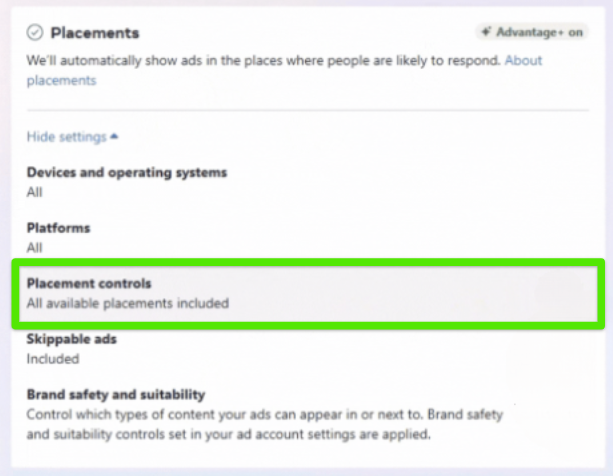
source: Meta Ads Panel
What Does This Mean for You?
Meta is deliberately making these settings less visible because it wants most advertisers to use automatic optimization and test different placements. However, if you have specific preferences for where your ads should appear, you’ll need to manually navigate through additional steps to regain full control.
Meta has introduced a new feature for Lead Generation campaigns – you can now automatically start a conversation with potential customers immediately after they fill out your lead form.
How Does It Work?
When a user submits a lead form and opts in for chat, a Messenger conversation will automatically start. Additionally, a View in Messenger button will appear on the thank-you page, allowing users to quickly access the chat thread.
How to Enable This Feature?
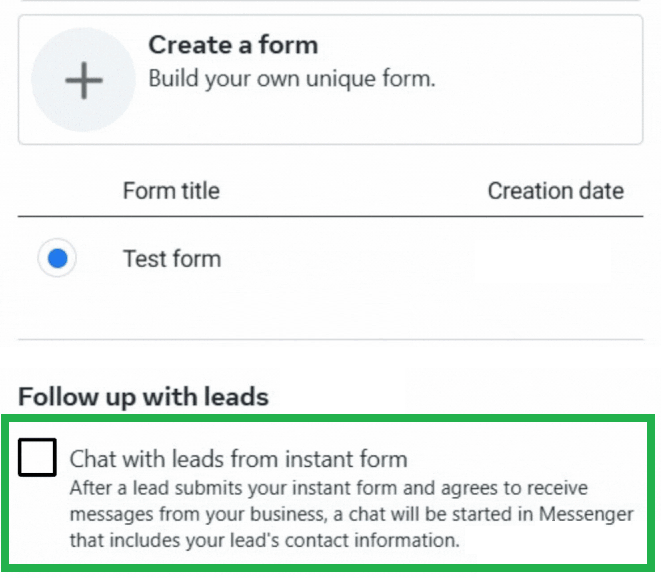
source: Meta Ads Panel
What Does This Mean for You?
With this feature, you can engage with potential customers faster, increasing your chances of conversion. Instant interaction improves user engagement and makes it easier to guide them through the sales process. If you’re looking to enhance the effectiveness of your lead generation campaigns, it’s worth testing this option to see how it impacts your results!
Meta is inviting advertisers to connect Google Analytics with Meta, which may provide early access to new updates that enhance campaign performance. In January 2025, Meta conducted an experiment on 1,075 advertisers across 20 industries, revealing that this integration led to a 5% average increase in conversions.
How Does It Work?
Once the setup is complete, Meta will be able to receive conversion data from Google Analytics, helping to improve cross-platform performance analysis. Additionally, Meta suggests that this integration may also enable early access to new ad system updates, which could enhance campaign efficiency.
What Does This Mean for You?
This integration allows you to gain a more comprehensive view of your ad performance by comparing data across Meta Ads and Google Analytics. To get started, go to Events Manager in Meta Business Suite, navigate to Partner Integrations, select Google Analytics, and follow the setup instructions. Keep in mind that this feature may not yet be available for your ad account.
Meta has introduced a new feature for Sales campaigns – if you optimize for Maximize Conversion Value, you can now include 1-day view attribution.
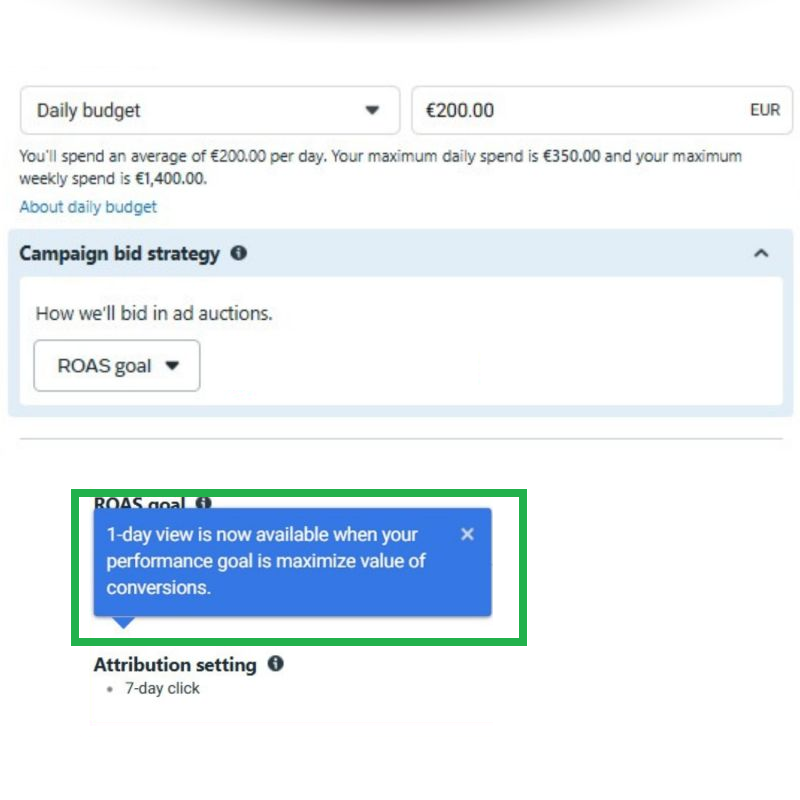
source: Meta Ads Panel
1-day view attribution allows you to track conversions that occur within one day after an ad is viewed. This can help advertisers measure ad effectiveness faster and optimize for higher conversion value.
To enable this option, you need to:
However, not all advertisers are eligible. Your ad account must have generated at least 30 optimized purchase conversions with values in the last 7 days to qualify for value-based optimization.
What Does This Mean for You?
This update can help you assess ad performance more quickly and refine your campaign optimization strategy. If you’re running value-optimized sales campaigns, check if this feature is available in your account and test its impact on your results.
Google is introducing a new label displaying the price at checkout for both paid and organic listings in Google Shopping. This is aimed at increasing price transparency, but it also presents risks for sellers.
This new feature will provide greater price transparency, as buyers will be able to see the final amount before completing the purchase, reducing unexpected changes. At the same time, it places more responsibility on sellers – if the price in the shopping cart differs from the price displayed in the offer, Google may impose an account suspension.
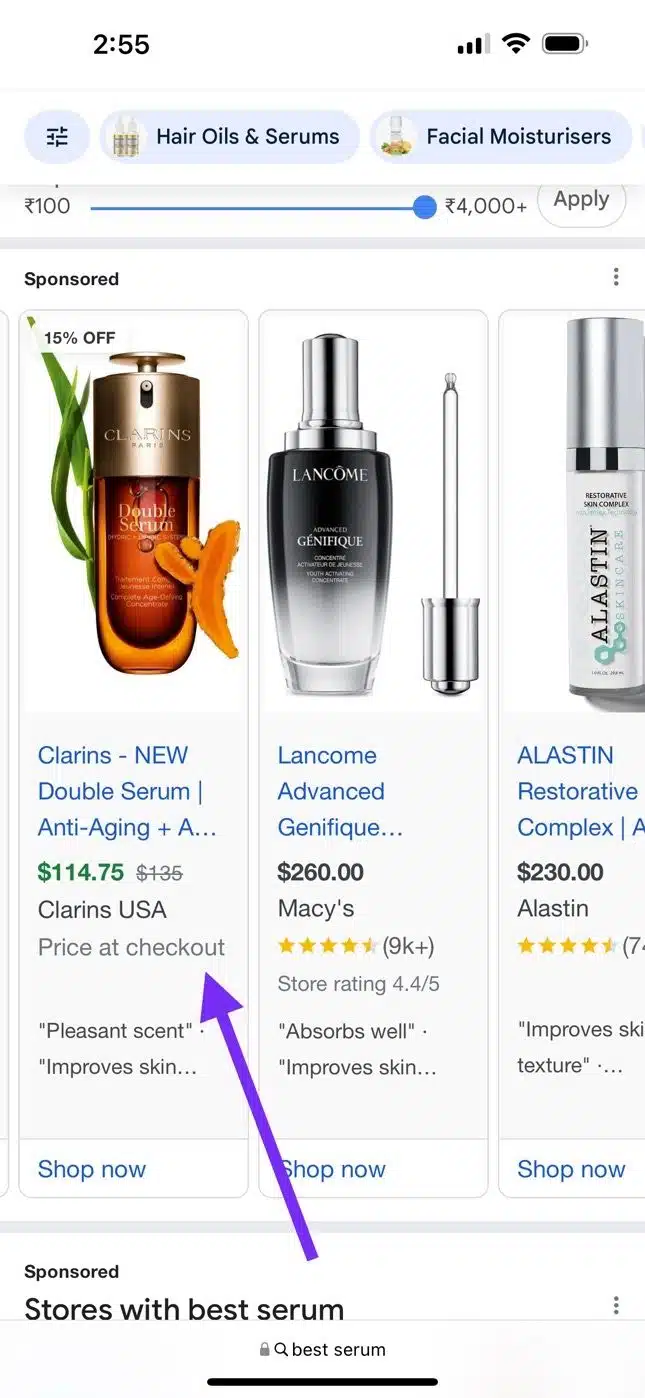
source: Search Engine Land
What Does This Mean for You?
If you sell through Google Shopping, make sure that the prices in your feed match those in the checkout process. Price consistency is crucial to avoid issues with violating Google’s policies. This change emphasizes Google’s increasing focus on transparency in e-commerce, which could foster greater customer trust in honest sellers.
Meta is introducing a new feature that allows you to add brand visual identity elements at the ad level. You can upload your logo, choose a font, and specify up to three colors that will be applied to headers, captions, and graphic overlays. Once this option is activated, Meta can use your branding preferences when automatically generating images and graphic overlays. This feature is turned off by default, but it can be manually enabled, and edited or deactivated at any time.
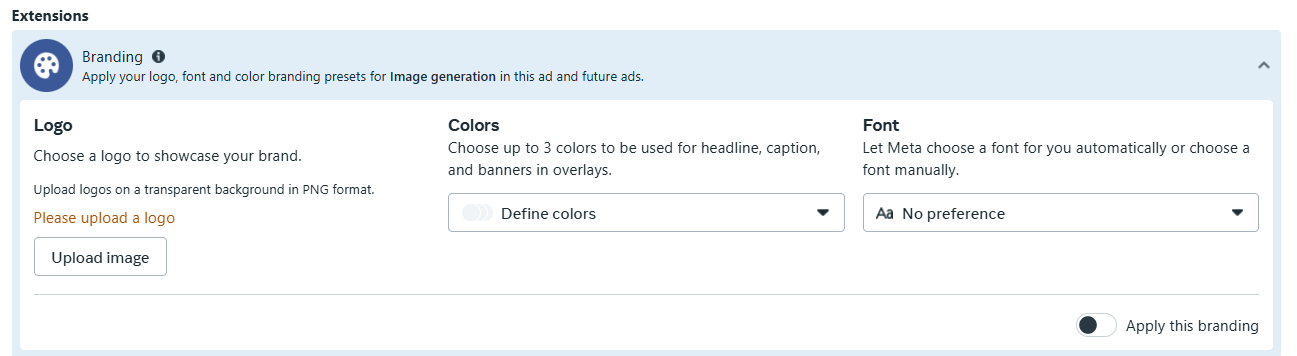
source: Meta Ads Panel
What Does This Mean for You?
The new feature allows for visual consistency in AI-generated images, saving time and ensuring that ads align with your brand identity. However, it’s recommended to regularly review the generated graphics before publishing to make sure they match your image.