
We’ve written about Google Ads and its advantages multiple times and today we’re going to continue the subject. So if you’re wondering what a perfect Google Ads campaign should look like and you aren’t 100% sure how to create it from scratch, you’re just in the right place at the right time. Now it’s time to get to know a handful of useful tips prepared specially for you. (if your Adblock is turned on it can block graphics in this entry, please turn it off temporarily to see everything we’ve prepared)
Basic information about Google Ads campaigns
On our blog we’ve already talked about the basics of Google Ads, a tool incorporated in the SEO industry in 2000. However, creating your own Google Ads campaign remained an open question for a long time. Today, with the help of our article, you’ll finally find the answers to all the questions that you could think of and that haven’t been answered yet. By using screenshots and sharing with you a few useful tips, we’ll prove that everything what seemed a difficult and complicated process until now, is much easier in reality. Below we’ve prepared a description of how to easily create an effective Google Ads campaign and to what details you should pay particular attention to achieve the best results. In order to make this text more comprehensible for our clients, help you organize the structure of the post and enable coming back to a particular point anytime you want, there is also an agenda that makes it easier to navigate through the text.
- Introduction;
- Glossary;
- Step one – creating a Google Ads account;
- Step two – a Google Ads campaign;
- Step three – creating advertising groups;
- Step four – creating an ad;
- Step five – choosing keywords;
- Step six – setting up the budget;
Glossary
This is the starting point of Google Ads campaigns which contains the most important terms that you should get familiar with before beginning your work with Google Ads. All the definitions which were used come from the official Google website.
Google Ads campaign
These are simply ad groups (ads, keywords and bids) that have a common targeting on localization, budget and other settings. Campaigns are often used to help you organize the products or services you offer by categories.
Advertising groups
It’s a set of keywords, advertisements and offers that you manage together in order to show the users those ads they’re likely to be interested in.
Keywords
Keywords are simply words or phrases describing your products or services in a way that makes it easier to determine when and where your advertisements will be displayed.
Budget
This is the amount of money set separately for every campaign and it specifies how much you’re willing to spend on average per day on advertising.
Google Ads account
Your adventure with Google Ads starts with creating a new account. Google makes it noticeably easier provided you already have the gmail account because then you’re able to effortlessly connect it with your new Google Ads account, as shown on the screenshot below. So let’s get it started! Your first step will be to enter the following website: 
The basics of creating a Google Ads campaign
Once you’ve the account, Google will automatically redirect you to the main management panel of Google Ads. Here, you’re going to create a new account by clicking on a red button that says “create an account”, later you select the name and click on it. Then, you’ll be taken to the page shown below and all you’ve to do is to click on the button “create a new campaign” as in the screenshot:  Until now everything seems to be a real piece of cake, doesn’t it? Well, to tell you the truth, it won’t get more complicated, so let’s continue! When creating a new campaign, it’s important to pay attention to the chief elements such as:
- The type of the campaign
You’ve to choose the type of your campaign depending on the options you want to use and the place where your ads are going to be displayed. 
- The target
Here, let’s choose the most popular form of Google advertising – the Google Search Network with the view to increase the traffic on the website.  If you wish, you can also provide your website address which will be used in the next stages of creating the campaign.
- The name
The name should be not only friendly and understandable for you but also linked to the products or services that are going to be advertised. Today we’ll create an exemplary Google Ads campaign for a bicycle shop.  Our campaign will focus on the most famous type of Google Ads advertising and therefore we need to turn off the automatically selected targeting in the Display Network. It’s also possible to optionally add redirecting to Google search partners.
- The localization
Determining the area of activity you direct the campaign to is very important in the case of Google Ads. For example, as your target you can choose either whole country excluding several places or one particular area or city you’re interested in. It’s especially significant because the more accurately you determine it, the greater the chance that you will reach clients who are really concerned about your services.  How to exclude a particular localization? If you want to direct your advertisements to a certain area but at the same time you want to exclude one city, all you have to do is to click on “exclude” when adding a new location as shown in the screenshot below:
- The daily budget
Consider how much money you’re willing to spend every day on your campaign. For instance, the default rate of our exemplary Google Ads campaign will be USD 0,04 and we set our daily budget at USD 25. 
- An ad schedule
The schedule is also very important because unless your target group uses the Internet at 1 a.m., it’s pointless to display the ads at this time. Therefore, it’s essential to adjust the ad schedule to the hours when the potential customers are likely to search for the advertised products. Let’s suppose that for our bicycle shop we’ll display the ads from March 17, Monday to Friday from 10 a.m. to 6 p.m. 
Creating advertising groups
Another important aspect concerns dividing your Google Ads campaign into various advertising groups. So, if our exemplary campaign is designed for a bicycle shop and we aim at increasing the number of visits to our website which would also result in selling a certain amount of products, the bicycles should be divided into categories if there is more than one type in the offer. It seems that the most optimal solution would be to create various types of advertisements not only for women’s, men’s or children’s bikes but also for the unusual models such as tandems. This way each ad will be ideally suited to the target group. Moreover, thanks to it you’ll avoid the risk of offering kids’ bike to someone who is looking for a women’s bike. The tree view of campaigns and advertising groups should resemble the tree view of categories in the shop.  If you forget about categorizing your products you can be sure that your target users will either ignore the ads or leave your website and because of such a tiny mistake you‘ll lose the potential customers. When creating an advertising group, on the right side you can see the keyword planner which will help you to choose appropriate words and phrases.
Advertising time slots
What else is important? It’s a good idea to choose at least three ads for one advertising group. Why? It helps you to compare the effectiveness of two or more ads that are displayed alternately and this can be done simply by turning on ad rotation in the settings of your campaign. This option gives you many possibilities such as constant monitoring of how your advertisements work or choosing the most effective one so it’s worth to take advantage of it.  Let’s start from creating an advertisement. This is how the panel in which we’ll work for the next few minutes looks like:
  A text ad itself can be maximally 140 characters long, therefore it may be not enough to show off all your assets. You have to use every character reasonably. Here, it’s very catchy and advisable to include in your ad the information about sales, the price of a given service or free delivery. What’s more, your advertisement should end with CTA (call to action) and to put it simple, this is an expression or a phrase like “check”, “see”, “try” or “buy” that encourages users to check your offer. Remember not to add any special characters to your ad content.
  Other useful solutions that can draw customers’ attention are ads in which every word starts with a capital letter, unique selling proposition (USP), ads using multiple questions, exposing the benefits of purchasing a given product and containing words such as reliable, high quality, best, cheaper or guaranteed. You can also bring your ads to perfection by adding various ad extensions. So if your advertisement was intended for mobile devices and you implement a call extension, the users will be able to easily contact you. Apart from that, you can also think about extensions to subpages so that next to your ad there’d be a direct link to pages such as “contact” or “current offer”. How to do it? Go to the navigation panel of your campaign or click on the ad groups on the right side.
  You can also add extensions to subpages and thanks to them the search engine will be displaying not only the home page but also the added subpages, for example the price list.
  This is how a subpage extension looks like in practice:
 Selecting keywords in Google Ads campaigns
Now it’s time for choosing appropriate keywords. You can add the keywords either at the stage of creating ad groups or later. We’ll show you an example of how to add keywords for an already created advertising group.  How to select them? Well, the easiest way is to use your own ideas or Google Analytics data. When you run out of your own keywords, you can always use Google hints. Keyword Planner is particularly useful and convenient at this stage as it not only shows you words that are the most popular at the moment but also suggests those that have been selected specifically for your product. To use the planner click on the tools and then choose Keyword Planner.
 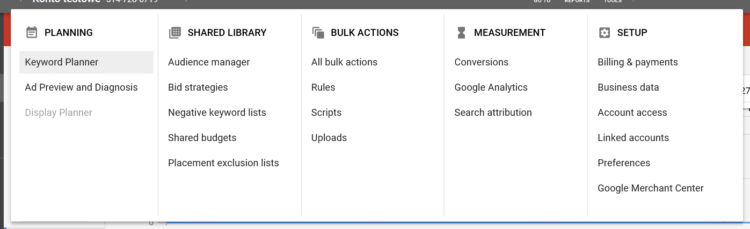 Choose the option “find keywords”, as shown below, to start looking for keywords suitable for your advertisement.
  Then, enter exemplary phrases or find suggestions based on your competitors’ or your own website.
  When searching for keywords, remember to set such parameters as language or localization. From the received list of phrases select the ones that you find the most captivating and add them to your plan. In the plan you’ll also get feedback concerning details of localization or devices and trends for the phrases.
  From the Keywords view you’ve the possibility to survey the efficiency forecasts or the historical data and based on them you can even create a new campaign. When selecting new words or phrases, remember about keyword match types. This is particularly important as it helps you to avoid the risk of advertising a kids’ or racing bike to someone who is looking for a women’s city bike. Various keyword matching options make it easy both for users and for business owners to tell Google what they’re looking for and what isn’t their cup of tea.
  However, if the keyword matching options offered by Google Ads don’t convince you, it’s a good idea to add negative keywords which have a very similar effect. So, if for example “a women’s bike” is your keyword, add “men’s” or “kids” to the negative keywords. The section with negative keywords can be found in a separate keyword tab. What to consider when choosing keywords? First of all, try to think as your customers. Imagine that they’re looking for a kids’ bike, what will they type in the search engine? Pay attention to the quality of keywords, because they determine the match for the advertising group. If you can’t see the quality score for your keywords, you simply have to turn it on. Continue as shown on the screenshots below. Click on the “columns” and then select the appropriate quality score data.
  Your keyword quality score should be between 7 and 10 points.
Set your initial Google Ads bids and make a payment
Now there is only one, very simple part left – set the bids for your ads, keywords and make the payment. And voila! Your Google Ads campaign is ready! However, if you’re still interested you can read more about bid settings at Google. You’ve to admit it wasn’t that bad. Now, when you’ve done everything properly, your advertisements will be displayed to the users searching for products like yours. Still wondering whether it’s profitable? If so, we recommend you reading our previous articles concerning Google Ads and its features. Then, you’ll surely be well versed in the subject of the campaigns and thanks to it you’ll easily decide whether you need PPC or Facebook advertising or maybe it’ll turn out that website positioning is sufficient for your business.