Not Just Text: How to Optimize Video and Infographics to Appear in Multimodal AI Answers

4min.

Comments:0

28 July 2026

Not Just Text: How to Optimize Video and Infographics to Appear in Multimodal AI Answersd-tags
Want your video and infographics to show up in answers from ChatGPT, Perplexity, or Google AI Overviews? The catch is that a model usually does not "see" a nice graphic, it reads the text and data around it. How do you prepare visual assets so AI can read and cite them? What should you watch out for, from video transcripts to infographic structured data? Read on!

4min.

Comments:0

28 July 2026

Video and infographics appear in AI answers when you add a layer of text and data to them: transcripts and captions for video, key figures and descriptive alt text for infographics, plus VideoObject and ImageObject structured data. A model will show what it can read and cite, not what looks nicest. Optimizing video and infographics for AI is exactly about building that readable layer.

AISO checklist for visual content.

Why Optimizing Video and Infographics for AI Is Something New

Search engines have stopped answering with text alone. Google AI Overviews, ChatGPT, Perplexity, and Gemini weave images, charts, and clips into their answers, and the model decides which ones to show. The visual asset itself is a separate signal here, not just a decoration for the text.

Models are getting better at recognizing images, but in search they rarely analyze every pixel on a page, because at the scale of the whole internet that is too costly and slow. Most often they reach a graphic through the layer of text and metadata: alt text, caption, transcript, structured data, and the surrounding text, and it is that layer that decides whether the material even enters consideration.

Full machine “vision” does happen, especially when an image goes straight to the model, for example uploaded in a query or through Google Lens. That is why, for now, solid attributes and a text layer are the safer route, and classic image SEO, focused on speed and thumbnails, is no longer enough.

Optimizing visual content for AI has two goals: getting the model to show your image or clip in an answer, and getting it to cite what they convey. The same layer of text and data that describes the visual leads to both.

How to Optimize an Infographic for AI

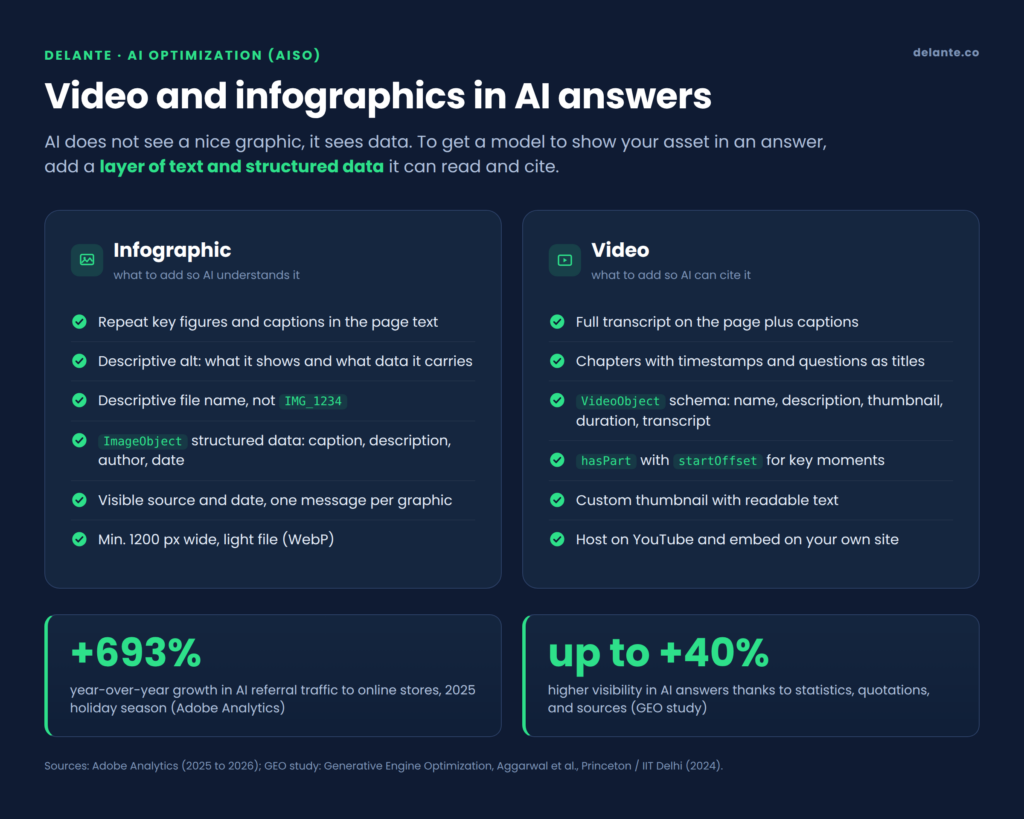
An infographic attracts people, but whether AI finds and shows it depends on the text layer around it. So repeat the key data from the graphic in the page text too, not instead of the image, but alongside it. Numbers trapped only in pixels, for now, easily get lost while AI reads through the content.

Here are a few practical tips on how to do it:

  1. Repeat the key figures and takeaways in the page text, within about 150 words of the graphic.
  2. Write descriptive alt text: what the infographic shows and what value it carries, not just how it looks.
  3. Give the file a descriptive name, for example three-season-tent-comparison.png instead of IMG_1234.png.
  4. Add ImageObject structured data with the caption, description, creator, and datePublished fields.
  5. Export the graphic at least 1200 px wide and in a light format, such as WebP.

How to Prepare a Video So AI Can Cite It

A video without text is almost invisible to a model, so a transcript is your best friend when optimizing video for AI.

The order of actions:

  1. Publish the transcript in your page code: visibly, in an expandable “Show transcript” block, or in VideoObject structured data. Add captions to the recording itself, ideally edited, not only automatic.
  2. Split the material into chapters with timestamps, and phrase the chapter titles as questions.
  3. Fill in VideoObject: name, description, thumbnailUrl, uploadDate, duration, and transcript.
  4. Use hasPart with startOffset and endOffset so the model can point to a specific moment.
  5. Prepare your own thumbnail with readable text, not a random frame.
  6. Host the recording on YouTube and embed it on your site.

How AISO Differs From Classic Image and Video SEO

The difference comes down to the goal: SEO fought for a thumbnail in the results, AISO fights for a citation in the assistant’s answer. You will prepare the same file differently for a search engine and for a model.

ElementClassic SEOAI optimization (AISO)
Alt textShort, for a keywordDescriptive, with a specific figure to cite
File nameKeywordFull content context
Video transcriptOptionalRequired
Structured dataBasicImageObject and VideoObject with hasPart
GoalThumbnail in Google ImagesCitation in the assistant’s answer

What Else Makes AI Cite Your Content More Often?

Optimizing visual content works best on a well-structured page, where all the content is written to be cited by AI. A model cites what it can extract as a whole and match to the question. Eight universal tips:

  1. Start with the answer. Put a concise, self-contained answer of 30 to 50 words at the start of the page and every section.
  2. Phrase headings as questions, the way a user would ask an assistant.
  3. Use tables and lists, because a model pulls facts from them most easily.
  4. Give statistics with a link to the source. Adding statistics, quotations, and references boosts visibility in generative engines by up to 40%, as shown by the GEO study from a team at Princeton and IIT Delhi (1)(2).
  5. Write self-contained paragraphs; each should carry a full thought and stand on its own.
  6. Add an FAQ section and mark it up with FAQPage data, and the article with Article data including datePublished and dateModified.
  7. Update the content every 3 to 6 months. Freshness of information matters here.
  8. Mind E-E-A-T: a named author, consistent terminology, and semantic code.

The Most Common Mistakes That Make AI Skip Your Content

The biggest damage is not a lack of looks. It is a lack of consistency. Incomplete or contradictory data rules a piece out before it even gets a chance to compete for a position.

What to watch out for:

  • The image says one thing and the description another, and the feed gives a different price than the page.
  • Key data lives only on the graphic, with no counterpart in the text.
  • Video with no transcript, captions, or chapters.
  • Inconsistent naming: “navy” in one place, “dark blue” in another.
  • No sources, dates, or structured data.
  • The proverbial empty filler instead of specifics and numbers.

SEO Is the Foundation, AISO Is the New Layer

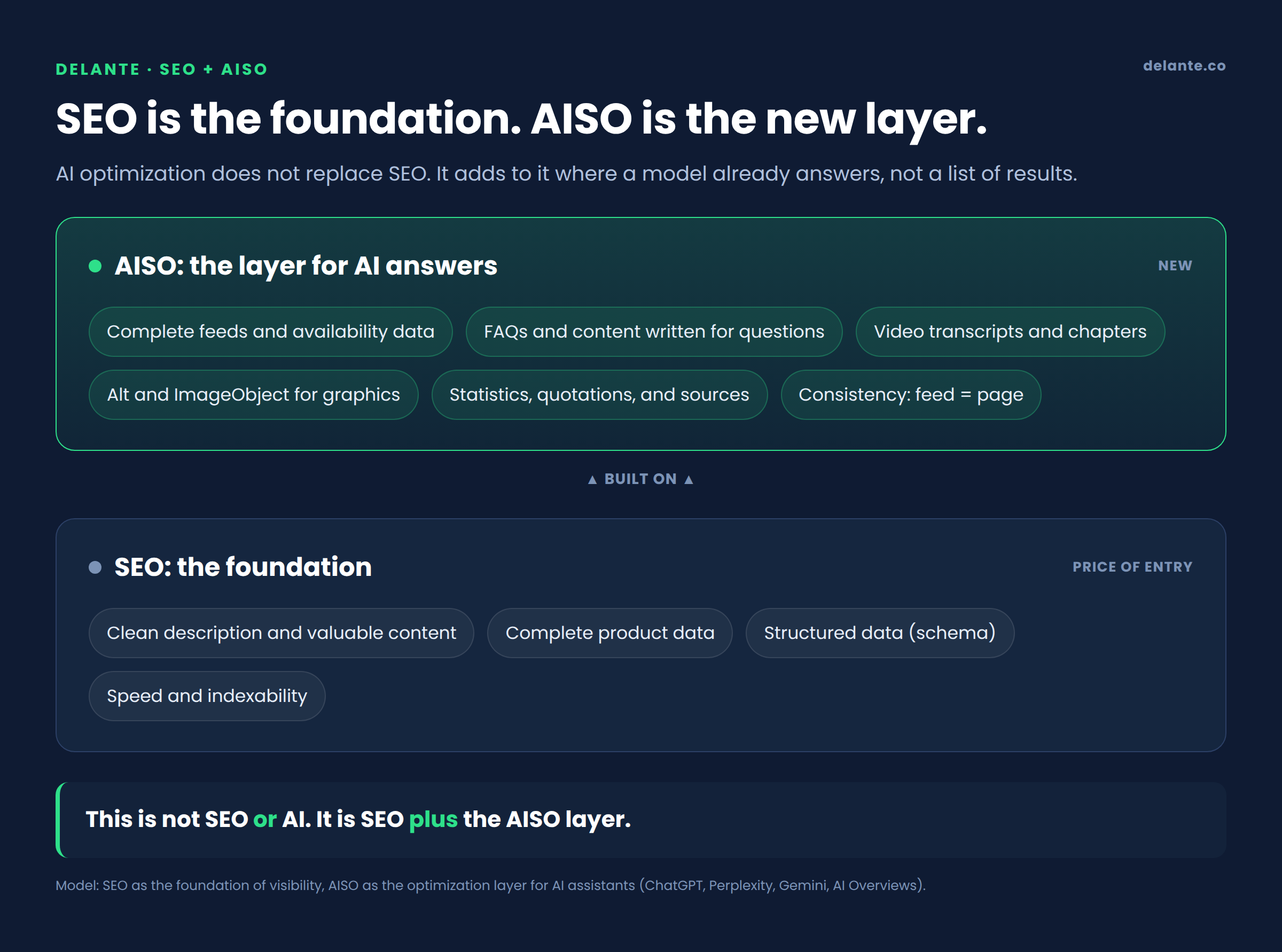
Classic SEO stays the foundation: a clean description, complete data, and schema are the price of entry. On top of that you build AISO, the layer for AI assistants: complete feeds, FAQs and content that answers questions, video transcripts, and image descriptions a model can understand. This is not a choice between SEO and AISO, it is SEO plus AISO.

SEO plus AISO as two layers of visibility.


According to Adobe Analytics, traffic from AI referrals to online stores grew 693% year over year in November and December 2025, and shoppers from that source converted 31% better than from other channels (3). Visual content ready for multimodal AI is starting to pay off.

If you are not sure which of your infographics and videos are ready for AI answers, start with an audit of your visual content for AISO. The Delante team checks structured data, transcripts, and feed consistency, then lays out a plan that improves your chances of being cited.

Your visual content can work for your visibility in AI.

We will review your video, infographics, and structured data. We will point out the gaps and implement the changes.

Contact us!
Michał Grzyb
Michał Grzyb SEO & AI Specialist


Sources:

(1) GEO study: Generative Engine Optimization, Aggarwal et al. (Princeton, IIT Delhi): https://arxiv.org/pdf/2311.09735

(2) Search Engine Land, overview of the GEO study: https://searchengineland.com/generative-engine-optimization-framework-introduced-research-paper-435855

(3) Adobe Analytics (data for November and December 2025), via Digital Commerce 360: https://www.digitalcommerce360.com/2026/01/13/generative-ai-online-holiday-shopping-traffic-2025/


Author
Michał Grzyb - Junior SEO Specialist
Author
Michał Grzyb

SEO & AI Specialist

Graduate of Management at the Cracow University of Economics. His interest in internet marketing and SEO began during his studies and led him to start working at Delante in August 2022. Expert in building visibility in traditional search engines and AI models. Privately a lover of physical activity in any form and good food.

Author
Michał Grzyb - Junior SEO Specialist
Author
Michał Grzyb

SEO & AI Specialist

Graduate of Management at the Cracow University of Economics. His interest in internet marketing and SEO began during his studies and led him to start working at Delante in August 2022. Expert in building visibility in traditional search engines and AI models. Privately a lover of physical activity in any form and good food.

FAQ

How does optimizing visual content for AI differ from classic image SEO?

Classic image SEO makes sure a graphic loads fast and has alt text for the search engine. AI optimization goes further, because the model interprets the actual content of the image and video, so readable data, transcripts, and structured data matter. In practice you do both; the AISO layer supports the SEO foundation.

If models recognize images, are alt text and descriptions still needed?

Yes, because what a model can do is one thing, and what happens in AI search at global scale is another. Crawlers most often read the text and metadata of a page. They do not analyze every pixel, so alt text, captions, and structured data still decide whether your material makes it into an answer. Image recognition is especially useful where a graphic goes straight to the model, as with Google Lens.

Do I have to add a transcript to every video?

Yes, for material meant to answer users’ questions. A transcript gives the model text to cite. It does not have to be a visible wall of text, an expandable block or a transcript in VideoObject data is enough. For short, purely visual clips it matters less, but captions still help. Start with how-to and product videos. They bring the biggest return.

Which structured data matters most for video and infographics?

For graphics it is ImageObject with a caption, description, author, and date, and for video it is VideoObject with a transcript and hasPart pointing to key moments. On top of that, it is worth marking up the whole page with Article data and the questions section with FAQPage data. These tags connect the visual material to the page topic and make it easier for the model to cite.

How can I check whether AI shows my infographics and videos?

Ask assistants the questions your material answers, and note what they show and where they cite from. Results can vary; the same prompt may give a different answer even from hour to hour, so test regularly and record the changes. Add monitoring of traffic from AI referrals in your analytics. At Delante we have a tool for monitoring AI answers, and we can help with that.

How often should I update visual content for AISO?

A good rhythm is a review every 3 to 6 months, and more often for fast-moving topics. Refresh figures, dates, and sources, because freshness matters, especially in Perplexity. While you are at it, check that the feed matches the page and that transcripts are current.