A technical SEO audit in 2026 looks different than it did just three years ago. The web is being flooded with AI bot traffic. According to Cloudflare Radar's Q1 2026 report, bots now account for 30.6% of all web traffic, and most of them (GPTBot, ClaudeBot, PerplexityBot, CCBot) don't render JavaScript. That fundamentally reshuffles audit priorities. Today one of the most important questions isn't only "can Googlebot see my site," but also "can GPTBot and Perplexity pull facts from it to cite in an AI Overview?"
A 2026 technical SEO audit covers 12 areas, including the new AISO layer.
Most AI bots don’t render JavaScript, so SSR, dynamic rendering, or static generation is a must for SPAs.
Server log analysis is the dividing line between a deep diagnostic audit and a basic one. Without logs, an audit guesses what the bot is doing instead of showing you the data.
A quarterly cycle is recommended for enterprise and a semiannual one for mid-sized organizations, plus four triggers: a migration, a traffic drop, a Google core update, and a planned investment.
Red flags in an audit proposal: “audit in 24 hours,” no log analysis for sites with 10k+ URLs, a CSV file as the only output, and no ICE prioritization. Real deliverables: a prioritized task list, an executive summary, an implementation plan, a knowledge-transfer session, and 30-90 days of implementation support.
Realistic audit timelines: 2 weeks on average, 4-6 weeks for enterprise, not 24 hours. Realistic costs on the Polish market: PLN 3,000-5,000 for a quick audit, PLN 5,000-10,000 for a mid-sized one, and PLN 10,000-50,000 for enterprise.
A technical SEO audit is now one of the foundations of SEO, alongside content marketing and link building. Combined with Enterprise SEO and the AI SEO layer, it forms the operational core of every senior SEO manager’s work in 2026.
What Is a Technical SEO Audit? Definition and Scope in 2026
A technical SEO audit is a systematic analysis of a website’s technical aspects, measured against the rules of crawling, indexing, rendering, and performance, where failing to follow those rules lowers visibility in organic search results and in AI citations. In 2026 it covers 12 areas: crawler accessibility, indexing, Core Web Vitals, the Mobile-First Index, JavaScript rendering, structured data, information architecture, redirects and response codes, HTTPS and security, hreflang, server log analysis, and the new AISO layer, accessibility for AI bots.
It’s worth separating two terms that are often used interchangeably. An SEO audit in its full form also covers content analysis, search intent, the backlink profile, and competitors, which makes it a far broader service. A technical SEO audit is a subset of it that deals only with the infrastructure layer. When you see an offer for an “SEO audit without content analysis” on the market, it almost always means a technical audit.
What has changed in audit scope over the last three years? Five things.
First, Core Web Vitals were reformed. INP (Interaction to Next Paint) replaced First Input Delay in March 2024, which lowered the global mobile pass rate by roughly 5 percentage points.
Second, the Mobile-First Index was officially completed on October 31, 2023. It’s a standard now, not a work in progress.
Third, AI bots became a distinct traffic category that needs its own policy in robots.txt.
Fourth, schema.org gained importance as a signal for language models extracting content for AI Overviews, ChatGPT, and Perplexity.
Fifth, server log analysis, previously the domain of only the largest enterprise clients, has become the standard for any site above a few thousand URLs, because without logs you can’t answer a basic question: what is Googlebot actually doing on your site?
The Full Scope of a Technical SEO Audit: 12 Areas
The 2026 industry standard includes 12 areas. Below is each one with a definition, the most common mistakes, and the diagnostic tools.
1. Crawler Accessibility
Accessibility for search engine bots and AI bots is the foundation of the whole discipline. The audit covers the correctness of the robots.txt file, per-AI-bot policy, sitemap.xml structure, internal linking architecture, URL depth, and crawl traps, namely parameterized URLs, calendars, and faceted navigation that generate thousands of junk paths. Typical mistakes: a Disallow: / left over from staging, blocked CSS and JavaScript needed for rendering, and a sitemap containing noindex or 404 URLs.
According to a study by Oncrawl, the average enterprise-class site wastes 47% of its crawl budget on parameterized URLs with no ranking value that should be blocked from bots at the robots.txt level.
2. Indexing: What Google Keeps and What It Skips
Indexing is the second area, covering what Google actually includes in its index. The audit covers meta robots (noindex/nofollow) from the perspective of revenue-generating pages, canonical tags (whether they are self-referencing and whether they conflict with hreflang), duplicate content (print versions, AMP, parameterized duplicates), soft 404s, and thin content. The most common issues an audit catches: a noindex left over after a deployment test on priority pages, a canonical pointing to a 404 URL, a canonical that conflicts with hreflang, and index bloat from parameterized URLs nobody wants indexed.
3. Core Web Vitals: LCP, INP, CLS
Core Web Vitals are three metrics today: LCP (Largest Contentful Paint, “good” threshold under 2.5 s), INP (Interaction to Next Paint, “good” threshold under 200 ms, which replaced FID in March 2024), and CLS (Cumulative Layout Shift, “good” threshold under 0.1). All are measured at the 75th percentile of real users from the Chrome User Experience Report (CrUX). According to the HTTP Archive Web Almanac 2025, only 48% of mobile pages pass all three thresholds.
Introducing INP lowered the global mobile pass rate by roughly 5 percentage points. In an audit, the key step is comparing lab data (Lighthouse) with field data (CrUX). A gap larger than 20 points indicates a systemic problem.
4. Mobile-First Index: Content Parity and Compliance
After the MFI rollout was completed in October 2023, the audit today focuses not on “is the site mobile-first,” but on mobile-desktop content parity: whether the mobile version has identical content to the desktop one, whether it isn’t stripped down, and whether it carries the same structured data. What gets checked: status in GSC URL Inspection (“Crawled as: Googlebot Smartphone”), a comparative mobile vs desktop crawl, intrusive full-screen ads, tap targets, and the viewport. A complete guide to MFI is in our article What is the Mobile-First Index.
5. JavaScript Rendering
This is the area that changed character the most in 2026. What gets checked: whether the page is server-side rendered (SSR) or only loads after JavaScript executes (CSR), how Google’s Web Rendering Service handles the page, and whether the logs show a double-fetch pattern (an HTML request plus a rendering request from the WRS).
The key change in 2026: of the six major web crawlers, only AppleBot (WebKit-based) and Googlebot render JavaScript. GPTBot, ClaudeBot, PerplexityBot, and CCBot fetch raw HTML only. That means a 100% JavaScript site without SSR is practically invisible to AI search. Language models will see an empty page with a link to a JS bundle, not your content. A quick diagnostic test: curl -s [URL] | grep "key phrase" on a critical page. If the key phrase isn’t in the output, AI bots don’t see it either.
6. Structured Data: schema.org
Schema.org is now one of the signals for Google and every language model. The audit covers: the presence and correctness of types (Article, Product, BreadcrumbList, Organization), mobile vs desktop schema parity, validation through the Rich Results Test, and entity linking via the sameAs property (to Wikipedia, G2, official social media). It also assesses HTML semantics: whether content is described structurally or only styled with CSS. According to a 2026 DemandLocal study, only 12.4% of websites have schema.org structured data implemented, which is a huge competitive edge for those who do implement it. We go deeper in our guide Schema.org on a product page in an online store.
7. Information Architecture and Internal Linking
Here the audit covers: URL structure (depth, semantics, parameters vs paths), internal linking (PageRank distribution, anchor text, orphan pages with no internal links), breadcrumbs (from both a UX and a structured-data perspective), pagination, and faceted navigation, especially in e-commerce. Faceted navigation is one of the most common sources of wasted crawl budget in e-commerce: every filter combination generates a separate URL that Google shouldn’t index. We described how to manage filters from an SEO perspective in our article Indexing filter pages.
8. Redirects and Response Codes
What gets checked: the semantics of 301 vs 302 usage, redirect chains (each hop costs a separate crawler request and loses some equity), redirect loops, 4xx errors (the 404 vs 410 distinction carries semantic meaning), and 5xx errors (production alerts). A classic enterprise-client problem: a redirect chain with 3-4 hops created by repeated migrations, each one adding another 301, with nobody ever flattening the resulting chain. Five minutes of work for the dev team, but a repeated hit to crawl budget for the bot.
9. HTTPS, Security, Server Performance
The technical audit covers the server layer: TLS correctness (validity, algorithm, HTTP/2 or HTTP/3 support), mixed HTTPS/HTTP resources, HSTS, and Time To First Byte (TTFB) as a factor affecting LCP. A slow server means an LCP in the red zone regardless of front-end quality, which is why TTFB is audited as a priority.
10. Internationalization and hreflang
For multilingual or international sites, the audit checks: hreflang tag correctness (language codes, self-reference, x-default), consistency with canonical, architecture (subfolder vs subdomain vs ccTLD), and geotargeting in GSC. Hreflang errors are one of the most common enterprise-client problems. Audits typically find 15-30% of URLs with incorrect or inconsistent hreflang tags.
11. Server Log Analysis: The Line Between a Basic and a Diagnostic Audit
Log analysis is the area that separates a serious audit from a superficial one. In the logs you see what the bot actually does: which URLs it visits, which it ignores, and what response codes it gets. Log analysis reveals: the real crawl distribution per page template (product, category, blog), the pattern of errors over time, wasted crawl budget in hard numbers (typically 20-40% of the budget spent on low-value URLs on unaudited sites), and AI bot activity.
Stable large sites generate 50,000+ Googlebot requests per day, and without log analysis you’re left with guesses instead of data. Tools: Screaming Frog Log File Analyser for mid-sized projects, Botify / OnCrawl / JetOctopus for enterprise, and a custom data flow built on BigQuery or ClickHouse for the largest sites. For sites under 1,000 URLs, log analysis isn’t essential; for anything above that it gradually becomes the standard, and for enterprise it’s mandatory.
12. The AISO Layer: Auditing for AI Bots
This is the twelfth and newest audit area, one that didn’t even exist in 2022. What gets checked: per-AI-bot rules in robots.txt (GPTBot, OAI-SearchBot, ChatGPT-User, ClaudeBot, Claude-User, PerplexityBot, Perplexity-User, Google-Extended, CCBot, Bytespider, AppleBot-Extended), whether the site blocks all AI bots (which cuts it off from citations in ChatGPT, Claude, Perplexity, and AI Overviews), whether an llms.txt file exists (optional, but officially supported by Anthropic and OpenAI), whether content is extractable in raw HTML, and whether semantic HTML and ARIA correctly represent the structure for the accessibility tree (used by Playwright MCP and ChatGPT Atlas).
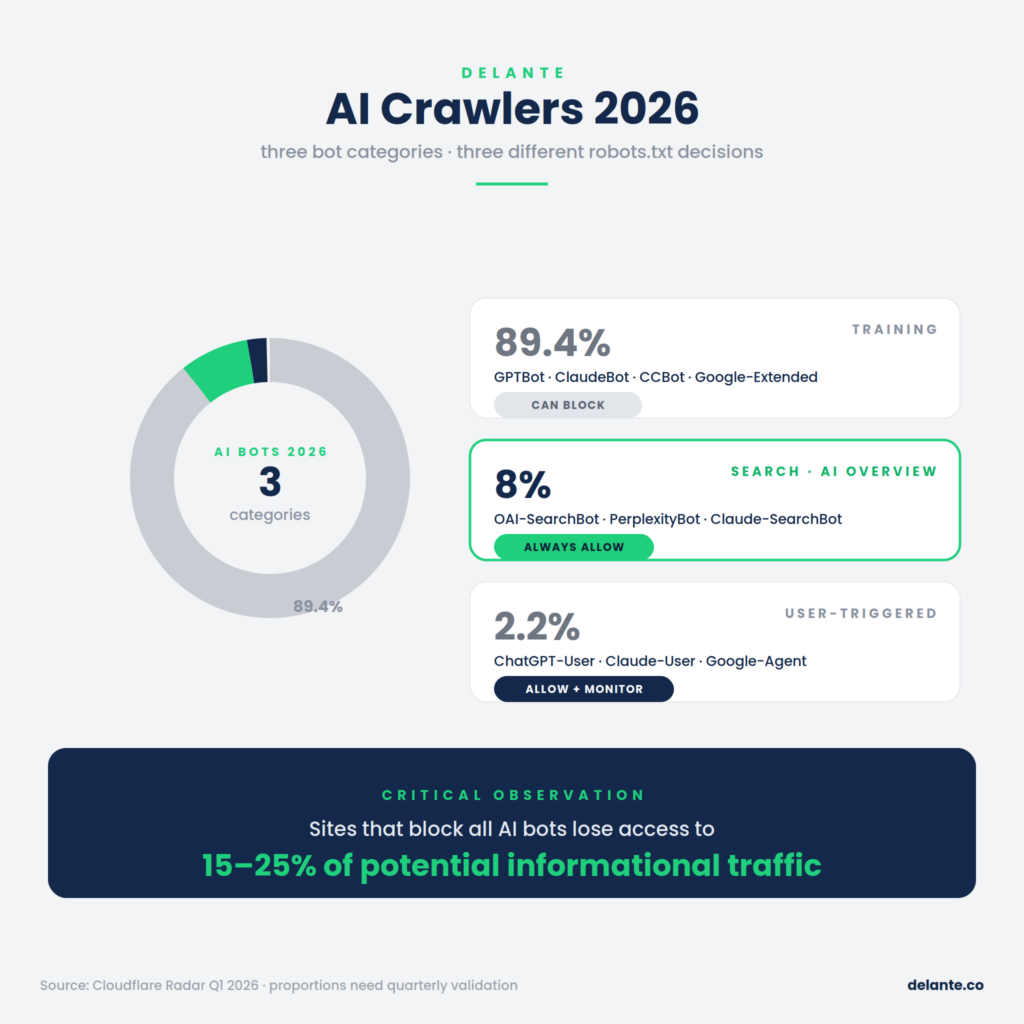
In Q1 2026, Cloudflare split AI bots into three categories that require separate decisions:
Category
Share of AI traffic
Purpose
Audit decision
Training crawlers (GPTBot, ClaudeBot, CCBot, Google-Extended)
89.4%
Collecting data to train models
A consent-to-train decision: you can block these without losing AI search visibility
Critical observation: in August 2025, more than 2.5 million sites blocked AI training crawlers through Cloudflare. Many of those decisions were overly broad. The blocks also covered search crawlers, which cut those sites off from citations in ChatGPT, Perplexity, and AI Overviews. According to seoscore.tools, sites that block all AI bots lose 15-25% of their potential informational traffic. You’ll find more on this in our article on AI SEO, and a practical guide to auditing for AI in our resource Auditing SEO for AI.
Technical SEO Audit vs SEO Audit vs Deep Diagnostic Audit: What’s the Difference?
These three terms are often used interchangeably in agency proposals, but they describe different services. The distinction matters for both budget and decision-making.
AI bots + schema + entities + content accessibility
16-40 h
AI visibility plan
Companies building AI search visibility
Quick audit
Screaming Frog crawl + GSC review only
4-8 h
CSV file + one-page summary
Diagnosis before a decision
Technical audit vs SEO audit: the first is a subset of the second. An SEO audit also covers content, search intent, the link profile, and brand. If an offer says “SEO audit without a content review,” it almost always means a technical audit.
Technical audit vs deep diagnostic audit: two different services sometimes sold under the same name. A basic audit identifies problems using crawlers and automated tools. A diagnostic audit goes deeper: log analysis (how bots actually visit the site), JavaScript rendering validation (whether the WRS correctly renders critical templates), crawl budget optimization, and root-cause analysis (why this specific problem arose, not just that it exists). A diagnostic audit includes a prioritization framework and an implementation plan, not just a list of problems.
The single biggest red flag in an agency proposal: no mention of log analysis for a site above 10,000 URLs. It means the “audit” will come down to a CSV export from Screaming Frog, with no insight into Googlebot’s actual behavior.
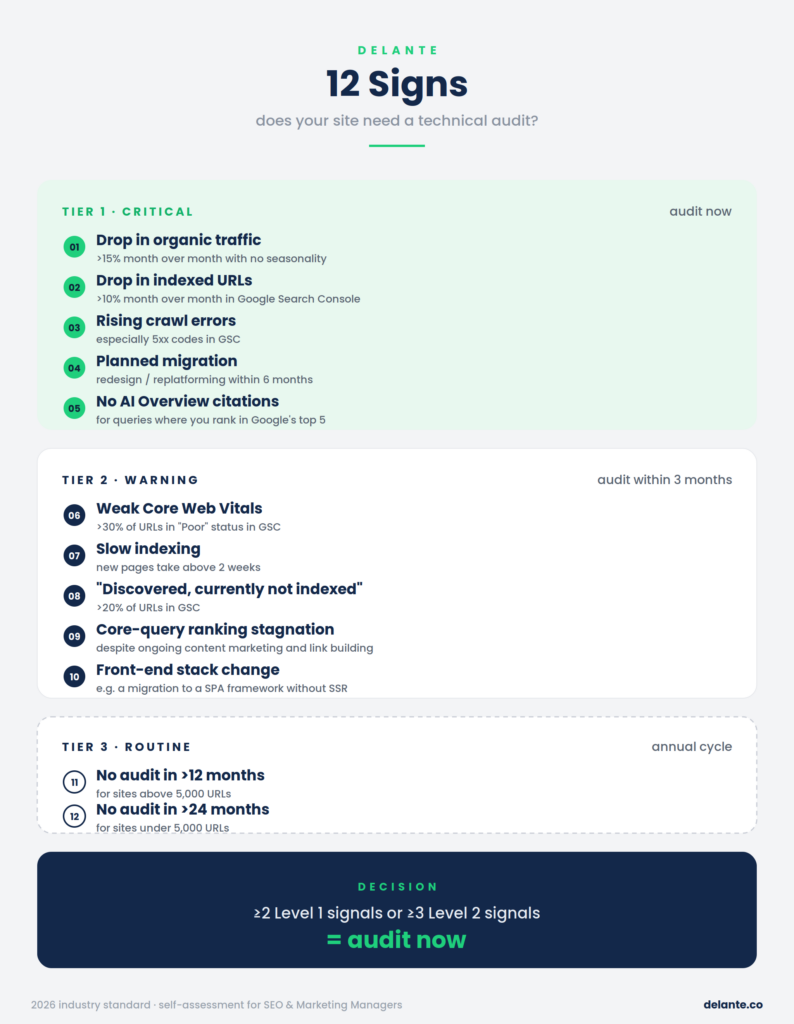
Does Your Site Need a Technical Audit? 12 Warning Signs
Before commissioning an audit from an external agency, it’s worth checking how urgent the situation is. The list below contains concrete, measurable signals split into three urgency levels. You can verify most of them in 5-10 minutes with access to Google Search Console and GA4.
Level 1, critical (audit immediately):
A drop in organic traffic above 15% month over month with no obvious seasonality or competitor campaign. This signals that something technical has likely broken, from a faulty deployment to a Google core update that exposed a weakness.
A drop in indexed URLs in GSC above 10% month over month. It means Google is deindexing your pages faster than it adds new ones.
A rise in crawl errors in GSC, especially 5xx codes. It signals infrastructure problems: the server has an issue that nobody on the business side noticed.
A planned migration, redesign, or platform change within 6 months. This is the moment when a pre-migration audit is an absolutely mandatory investment.
No AI Overview citations for queries where you rank in Google’s top 5. It indicates a technical problem with AI bot accessibility or content extractability.
Level 2, warning (audit within 3 months):
More than 30% of URLs in “Poor” status in the mobile Core Web Vitals report. That’s a runway toward losing rankings on competitive queries.
Time to index new pages above 2 weeks (checked via URL Inspection on 5-10 fresh URLs). It indicates a crawl budget or freshness problem.
“Discovered, currently not indexed” covers more than 20% of URLs. Google sees these pages but decided they aren’t worth indexing.
Ranking stagnation on your most important queries despite consistent content marketing and link building. A signal that the problem lies in the technical layer, not in content or the link profile.
A recent front-end stack change, a migration to a framework like Next.js, Nuxt, Astro, or React without SSR. It requires a rendering audit.
Level 3, routine (annual cycle):
No audit in the last 12 months for sites above 5,000 URLs. That’s the window in which 30-50 mid-level problems usually pile up.
No audit in the last 24 months for sites under 5,000 URLs. Smaller sites can run longer without an audit, but two years is the practical limit.
If you recognize at least two Level 1 signals or three Level 2 signals, an audit is a rational decision, not an overcautious one.
How to Quickly Check Your Site for SEO: A 30-Minute Self-Audit
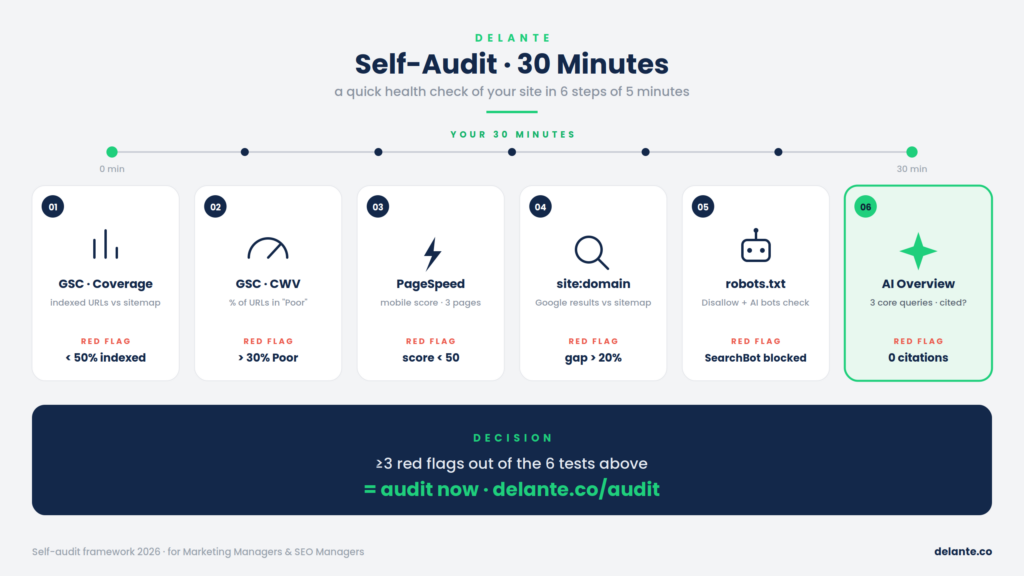
Before commissioning a full audit, you can run a quick preliminary check yourself. 30 minutes, free tools, six steps. The goal: determine whether there are signs of problems that justify a deeper audit, and catch critical errors you can hand to the dev team right away. You’ll find an extended step-by-step self-audit guide in our separate resource SEO site audit: how to run a simple audit yourself.
Step 1: Check GSC (10 minutes)
Log in to Google Search Console and check three things. The first is the Coverage report. Compare the number of indexed URLs with the total number of URLs on your site. If the gap is above 30%, look at what Google excludes and why. Set aside “Excluded by ‘noindex’ tag,” which is usually intentional, and focus on the “Discovered, currently not indexed” and “Crawled, currently not indexed” categories. These are URLs that Google sees but judged not worth indexing.
The second is the Core Web Vitals report. Check mobile and desktop separately. If mobile shows more than 30% of URLs as “Poor,” you have a concrete, measurable problem affecting rankings.
The third is the Performance report. Check the traffic and ranking trend over the last 16 months. In any visible drops, can you find a correlation with Google core updates from that period? If so, the audit should verify which update signals hit you hardest.
Go to pagespeed.web.dev and test three representative URLs: the homepage, one category (or a key service), and one product (or article). Check the mobile score, which should be above 70, ideally above 85. Compare CrUX field data with Lighthouse lab data. If the gap is larger than 20 points, you have a problem invisible from the perspective of a developer testing the site under ideal conditions, which is a signal to audit.
Step 3: Google Search Operators (5 minutes)
Three queries in Google reveal more than you’d think:
site:yourdomain.com, the number of indexed pages. Compare it with the number of URLs you’d expect.
site:yourdomain.com inurl:?, how many parameterized duplicates Google indexes. Each one competes for rankings with your priority URLs.
site:yourdomain.com -inurl:priority-template, what’s indexed outside your priority templates. This is the “long tail,” and it often turns out to contain old URLs from a previous CMS, blog tags, and author archives.
Step 4: robots.txt and sitemap (3 minutes)
Open yourdomain.com/robots.txt in your browser. Check two things: that there’s no Disallow: / (a classic error left over from staging) and that there are per-AI-bot rules defined (GPTBot, ClaudeBot, PerplexityBot). If no AI bot appears in the file, it means nobody made a deliberate decision about their access, which at the current scale of AI traffic is a gap.
Open yourdomain.com/sitemap.xml. Check whether it exists, returns a 200 code, and is current (the last-modified date). If the file is a sitemap index, check the child files too.
Step 5: Check Your AI Visibility (5 minutes)
Open a terminal or an online console with curl. Run a test on a critical product page or article:
If the key content (product name, price, description) doesn’t appear in the output, your site loads content only via JavaScript. Most AI bots don’t execute JS, so they see an empty page with a link to a code bundle. That means you’re practically invisible to ChatGPT, Perplexity, and Claude.
A second test: go to ChatGPT or Perplexity and ask “best [your category]” or “what to know about [your product].” Does your brand appear in the citations? If not, you have an AI search visibility problem independent of your traditional Google rankings.
Step 6 (optional): Screaming Frog Free Version (3 minutes)
Download the free version of Screaming Frog SEO Spider (500-URL limit). Run a crawl of your homepage. Check these tabs: Response Codes (4xx, 5xx errors), Page Titles (duplicate titles), Meta Description (missing ones), and Redirects (redirect chains). This is usually enough to detect basic problems, but for a site above 500 URLs this test covers only a fragment.
What You Can Detect Yourself, and What You Can’t
A self-audit lets you detect: critical problems (Disallow: /, noindex on revenue-generating pages, mass 5xx errors), symptoms indicating a need for a deeper audit (a low CWV pass rate, large gaps in index coverage), and immediate fixes to hand to the dev team (fix specific 404s with internal links).
What you can’t detect yourself: wasted crawl budget (you need logs), JavaScript rendering problems at the WRS level (you need to compare source HTML with the rendered DOM in Lighthouse), root-cause analysis (you need to cross-reference multiple data sources), hreflang errors at scale, schema validation at scale, and prioritizing 50+ problems.
A self-audit is enough for: sites under 500 URLs, a monthly health check after major changes, and diagnosis before deciding to commission a full audit. It isn’t enough for: mid-sized and large sites, e-commerce with facets, multilingual sites, after a sudden traffic drop, or before a migration.
When Should You Commission a Professional Audit? Triggers and Cycle
Regardless of the symptoms listed earlier, four situations are hard signals for an audit run as a project, not on a recurring cycle.
Situation 1: Migration, redesign, platform change. Industry estimates indicate that 60-70% of migrations done without an audit end in a 20-50% drop in organic traffic in the first 3 months. A pre-migration audit maps existing URLs and ranking signals; a post-migration audit verifies whether the redirect maps worked and whether the new architecture introduced any regressions. Related reading: Site migration: how to avoid a disaster and Site rebuilds and SEO.
Situation 2: A sudden drop in organic traffic. If you see a drop above 10-15% in a month with no obvious cause (seasonality, a competitor campaign, breaking news), a deep diagnostic audit with log analysis is the only way to find the root cause. Without logs you fall into speculation: maybe an algorithm update, maybe a migration at your hosting provider, maybe a deployment error.
Situation 3: A Google core update. Google releases core updates 3-4 times a year, and each one redistributes traffic across domains. If you see an effect on your visibility, a post-update audit should verify which signals the update amplified and whether your site meets them.
Situation 4: A planned investment in content or link building above PLN 50,000 per month. If you’re planning a significant investment in content marketing or link acquisition, audit the technical infrastructure first. Otherwise you’re scaling the problem, producing great content that Google won’t send bots to, or building links to noindex pages.
The audit cycle outside of triggers: for sites with 1k-50k URLs, a full technical audit every 6-12 months plus continuous monitoring through GSC and crawler alerts. For enterprise (50k+ URLs, e-commerce with 100k+ SKUs, media with high content output), a full audit on a quarterly cycle, a deep diagnostic audit once a year, and continuous monitoring through Botify or OnCrawl. You’ll find a larger article on the specifics of enterprise-class clients in Enterprise SEO.
Does a Technical SEO Audit Pay Off? The Cost of Not Auditing
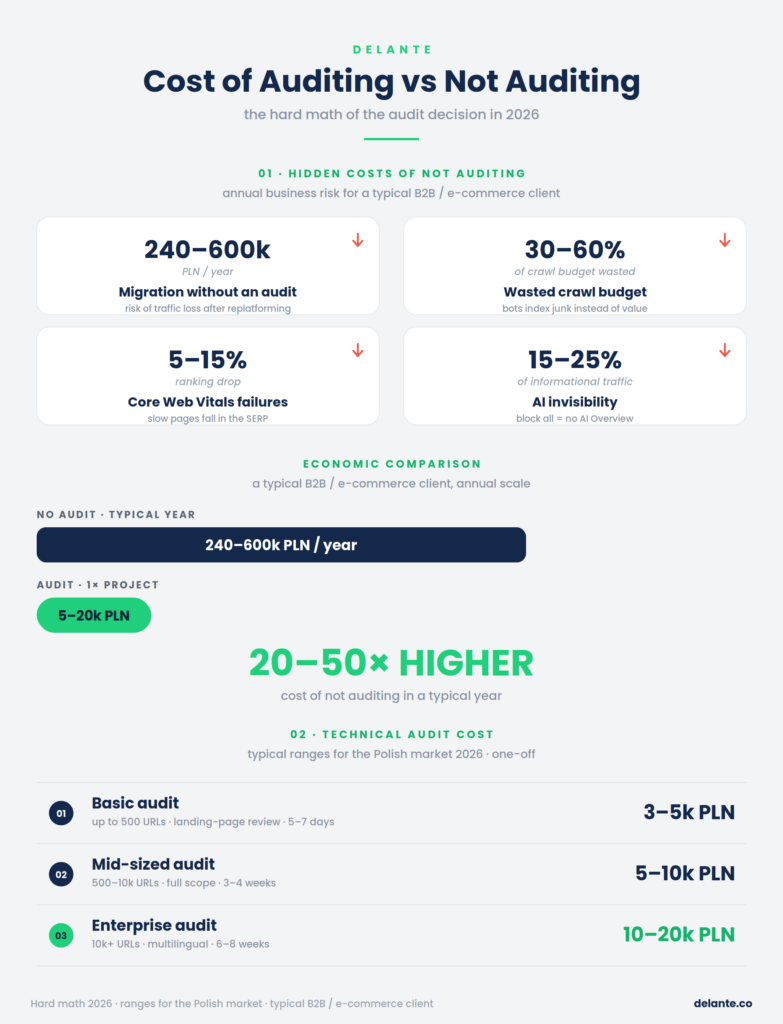
The question “is it worth investing in a professional technical SEO audit” comes down to simple math: compare the cost of the audit with the cost of not auditing. In typical cases, the cost of not auditing is 3-10 times higher than the cost of the audit itself, and we’re talking about losses measurable in quarterly organic-traffic revenue. We covered this more fully in our separate guide To pay or not to pay for a site audit.
Four typical situations that show the cost of not auditing:
Situation 1: Migration without an audit. 60-70% of migrations done without a professional pre-migration audit end in a 20-50% drop in organic traffic in the first three months. For a site whose organic traffic is worth PLN 100,000 per month, that means a loss of PLN 240,000-600,000 per year. A pre-migration audit on such a site typically costs PLN 15,000-50,000. The return on not auditing is negative within the first two months.
Situation 2: Wasted crawl budget. The average enterprise site without an audit wastes 30-60% of its crawl budget on URLs with no value: parameterized duplicates, faceted navigation, soft 404s, and redirect chains. The consequence: new products wait weeks for indexing, and the seasonal peak passes before Google reaches the fresh content. Crawl budget optimization after an audit typically returns a 15-25% improvement in crawl efficiency and a 10-15% traffic recovery in 6 months.
Situation 3: Unnoticed CWV problems. 48% of mobile pages globally fail the three CWV thresholds. After INP was introduced in March 2024, many sites previously considered responsive under FID had to refine their INP. Without an audit you don’t know whether your site is in that 48%, or which templates are critical. A ranking drop caused by CWV doesn’t show up in GSC as a “warning.” The rankings simply fall.
Situation 4: Invisibility in AI search. A site that blocks AI bots or is built 100% client-side (a SPA without SSR) is practically invisible to ChatGPT, Claude, Perplexity, and AI Overviews. Gartner predicts a 25% drop in traditional search volume by 2026, and that’s traffic that doesn’t come back. Related reading: Zero-click searches and AI Overviews and e-commerce.
DIY vs Professional: When Each Makes Sense
Dimension
DIY
Professional agency
Time
40-80 h of your team’s time
16-200 h of the auditor’s time (depending on scale)
Tool stack
Screaming Frog free version + GSC + Lighthouse
+ a log analyzer + a CWV monitor + Botify/OnCrawl for enterprise
Log analysis
practically impossible to do yourself
standard for mid-sized and up
Prioritization
no framework, intuition
ICE / RICE with an owner and an effort estimate
Implementation support
none
30-90 days of consulting with the dev team
Cost
hidden (your team’s time)
explicit (an invoice)
Risk: blind spots
high (the bias of your own perspective)
low (an outside perspective)
Makes sense for
sites under 1k URLs, monthly checks
sites above 5k URLs, strategic decisions
Break-even point: a mid-sized audit at PLN 15,000-30,000 pays for itself by recovering 3-5% of traffic in 90 days for a site whose organic traffic is worth PLN 100,000 per month. An enterprise audit at PLN 50,000-150,000 pays for itself by recovering 5-10% of traffic for a site generating above PLN 300,000 per month. These aren’t speculations; they’re typical results of audit implementations from industry benchmarks.
How to Price and Evaluate an Audit Proposal: What You Should Get
A technical audit proposal should clearly define the scope of work (which of the 12 areas it covers), the inputs (what access to GSC, GA4, and logs it requires), the timeline (typically 2-8 weeks), the deliverables (a prioritized task list plus a report plus a knowledge-transfer session), the tools involved (typically 4-5, not one), and implementation support (30-90 days after the report is delivered). If any of these elements is missing, it isn’t an audit, it’s a generated CSV file.
What Should Be in the Proposal
A checklist to verify before signing a contract:
Element
What to look for
Scope of work
A specific list of areas (not “a comprehensive audit”)
Tools
Named, ideally 4-5 (Screaming Frog + GSC + Lighthouse + a log analyzer + a CWV monitor)
Required inputs
Access to GSC, GA4, robots.txt for editing, log access or an export
Timeline
Specific weeks, not “to be agreed”
Deliverables
A prioritized task list + an executive summary + a technical report + a handoff session
Implementation support
Minimum 30 days of post-audit support
Accountability
A named, experienced auditor, not “the team”
Sample
The option to see an anonymized report from a previous client
Six Red Flags in a Proposal
1. “Audit in 24 hours” or “audit in 72 hours.” A real technical audit for a site above 10,000 URLs takes a minimum of 2 weeks. 24 hours = a template plus a Screaming Frog export, not an audit.
2. The output is a CSV or Excel file. Screaming Frog generates useful data, but that isn’t an audit. An audit = a prioritized task list plus interpretation, not a raw data dump.
3. No mention of log analysis for a site above 10,000 URLs. Without logs, the audit guesses what the bot is doing. This is a red flag, especially for enterprise-class clients.
4. No list of named tools. “We use the best SEO tools” means the proposal doesn’t specify which ones. A real audit: Screaming Frog plus Lighthouse plus GSC plus a log analyzer plus a CWV monitor, at a minimum.
5. No request for access to GSC or GA4. An audit without search ranking data is half as strong. Without GSC you don’t know which templates rank, so you don’t know which problems threaten rankings and which are cosmetic.
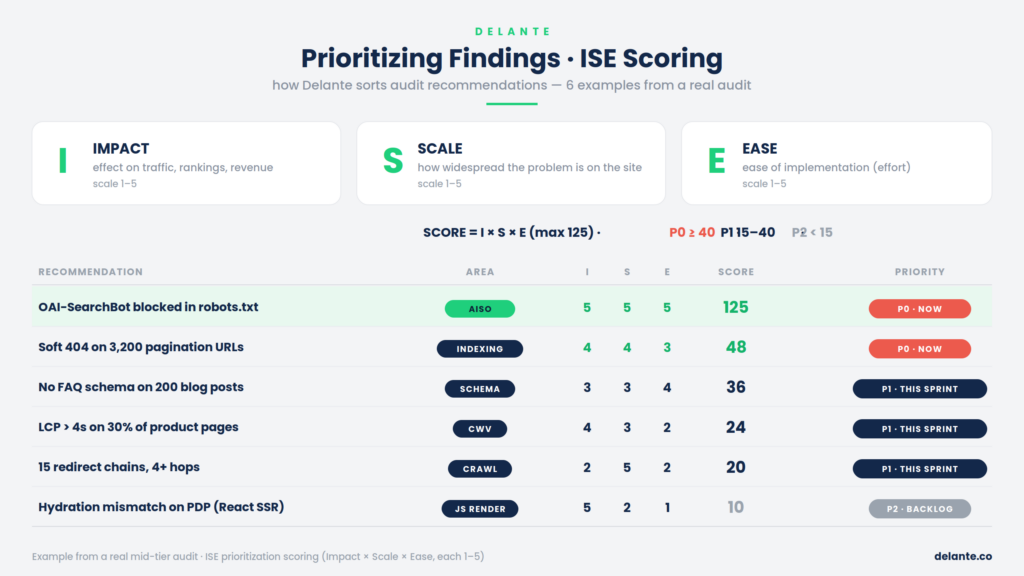
6. No prioritization framework. 200 problems without priorities are impossible to implement. A real audit: an ICE framework (Impact × Confidence × Ease) or similar, with an owner per problem and an effort estimate.
How an Audit Runs at an Agency: The Project Phases Over Time
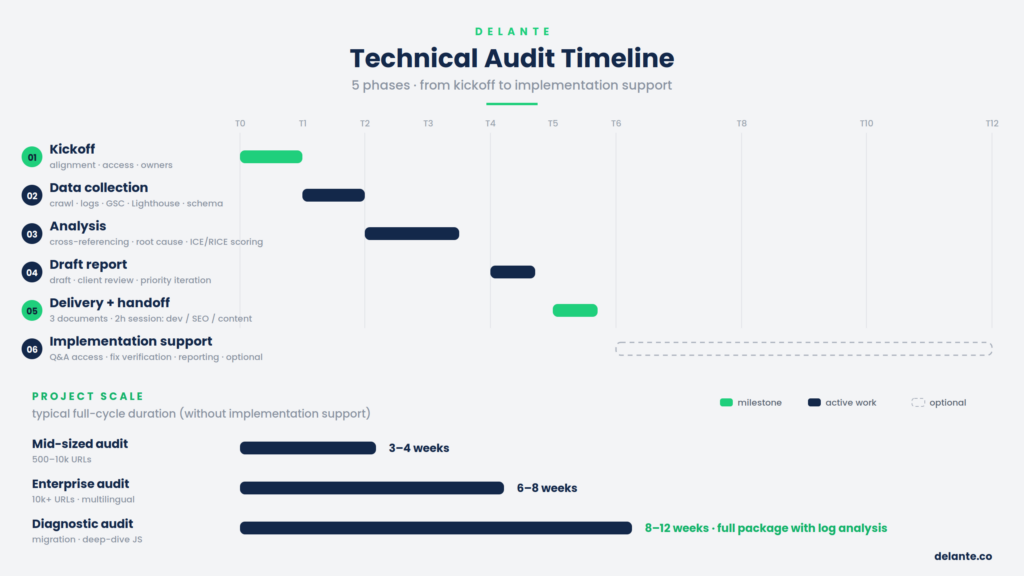
A professional technical SEO audit runs in five phases. Below is a typical timeline for a mid-sized audit (3-4 weeks); for enterprise, all phases are proportionally longer (6-8 weeks total).
Week 0: Kickoff (1-3 days). A kickoff meeting, agreeing on scope and KPIs. The agency collects access to GSC, GA4, robots.txt for editing, and possibly the CMS. On the client side, owners are assigned: the dev lead, the content lead, and the project sponsor. Communication channels are set (typically Slack or a dedicated Microsoft Teams channel).
Week 1: Data collection. A full site crawl with Screaming Frog or Sitebulb. Export and initial processing of server logs (if the audit includes log analysis). Pulling 16 months of GSC history. Lighthouse audits on priority URLs. Schema validation through the Rich Results Test and the Schema.org Validator.
Weeks 2-3: Analysis. This is the most intensive part of the project. Cross-referencing data from the crawl, logs, GSC, and GA4. JavaScript rendering validation per critical template. Identifying root causes (not just symptoms). ICE or RICE scoring of each problem. In a deep diagnostic audit, this includes a detailed analysis of bot behavior per template, identifying crawl traps, and mapping redirect chains.
Week 4: Draft report and iteration. The first version of the report and task list goes to the client. A review session (typically 1-2 hours), where the client reviews the findings and adjusts priorities based on business knowledge (e.g., “we’re retiring this template in 3 months, so the fix isn’t worth it”). The agency iterates on the report.
Week 5: Final delivery and handoff session. The client receives three documents: an executive summary (2-4 pages for the CFO/CMO), a findings report (detailed diagnostics per area), and a prioritized task list in a format ready to import into Jira or Asana. Then a 2-hour knowledge-transfer session with the dev, SEO, and content teams. This is a key moment, since face-to-face interpretation translates into better implementations.
Weeks 6-12: Implementation support (optional). Access to consulting for the dev team, verification calls after the most critical problems are implemented, and milestone reporting for the project sponsor.
Model Audit Deliverables: What You Physically Get
A full audit package should include:
An executive summary (2-4 pages), for the board, CFO, and CMO. The top 5 critical problems with a business translation and expected results expressed in numbers.
A findings report (40-80 pages), full diagnostics per area, with screenshots, data, and evidence.
A prioritized task list (typically 60-150 problems), in a spreadsheet, with fields for Impact, Confidence, Ease, ICE score, the responsible role, an effort estimate, and the expected result. Ready to import into Jira or Asana.
An implementation plan, a 30/60/90/180-day schedule with quick wins up front and dependencies mapped between tasks.
A knowledge-transfer session, typically 2 hours, for the dev, SEO, and content teams.
Implementation support, access to consulting for the dev team for 30-90 days after delivery.
This is the audit standard we deliver at Delante. For a deep diagnostic audit, add a log-analysis report (crawl distribution per template, the percentage of waste, and the AI bot share) plus diagnostics of the root causes behind identified traffic drops.
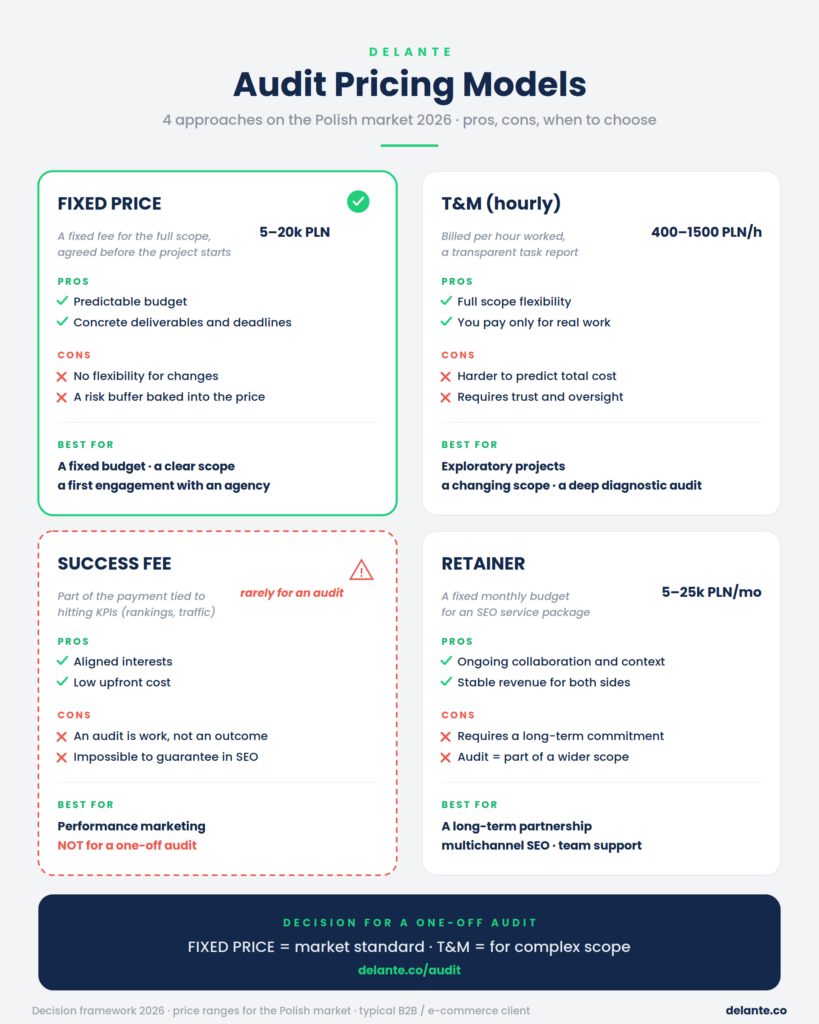
Pricing Models: What to Expect
Polish price ranges by scale and audit type:
Quick audit: PLN 3,000-5,000 (a small site up to 500 URLs, a basic crawl, 1-2 weeks)
What affects the price: site size (the number of URLs, the number of languages), complexity (e-commerce with facets, a SPA, international), the inclusion of log analysis (typically +30-50% of cost), implementation support (typically +20%), and the diagnostic vs basic version (a multiplier of 1.5-2x).
A quick audit under PLN 3,000 is typically a Screaming Frog dump plus a short comment, not an audit in the full sense. An enterprise audit under PLN 50,000 for a site above 10,000 URLs probably skips log analysis and implementation support, so it’s worth verifying the scope.
Technical SEO Audit Tools: The 2026 Stack
Real audits use 4-5 tools in combination. Here’s the list, grouped:
If an agency proposal lists only one tool (most often Screaming Frog), that isn’t an audit, it’s a crawl. A full audit reaches for 4-5 of these tools in combination, depending on the site’s specifics.
What Do You Get After an Audit? From Report to Implementation to Ranking Impact
Three Levels of Output That Are Valuable
Level 1: A task list for the dev team. A list of problems in a spreadsheet (Google Sheets, Notion, or directly in Jira / Asana / Linear). Each problem includes a title, a description, impact, effort, an owner, a deadline, status, and an ICE score. It can be turned into a ticket in 5 minutes.
Level 2: An implementation plan. A 30/60/90/180-day schedule. Quick wins (high impact, low effort) go into the first sprint. Critical risks (high impact, high effort) go into the first 60 days. Dependencies between problems are flagged, e.g., “schema implementation has to come after the layout refactor.”
Level 3: An executive summary. 2-4 pages for the CFO, CMO, and CEO. The top 5 critical problems with a business translation (not “a redirect chain in the navigation,” but “we’re losing 15% of our potential crawl budget on paths nobody indexes, which translates into delayed indexing of new products”). Expected results expressed in numbers. An investment estimate: developer hours plus tool costs plus optional external services.
How a Technical Audit Translates Into Search Rankings
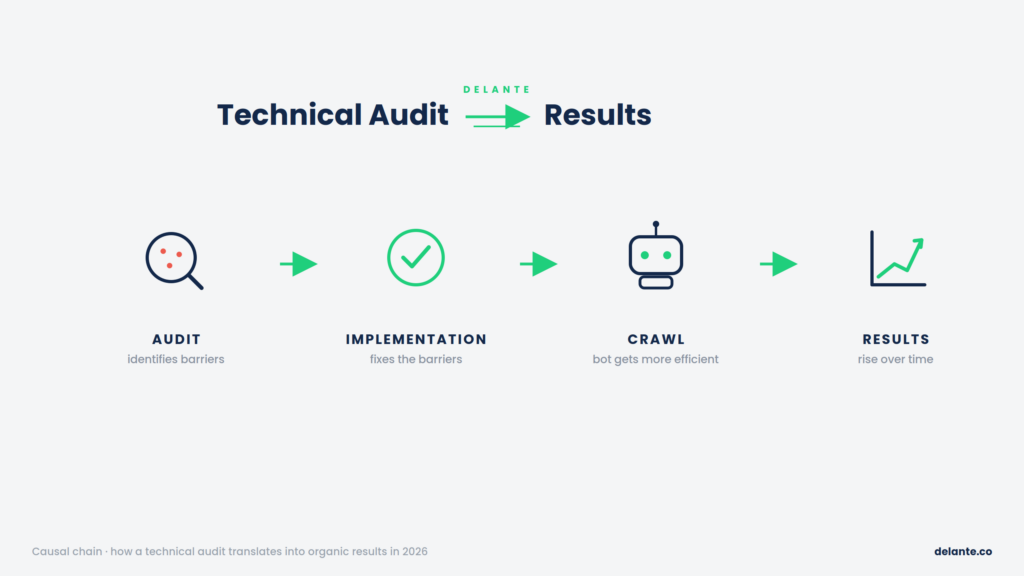
This is the question a marketing manager has to be able to answer in front of the CFO. The causal chain has four links:
Link 1: The audit identifies technical barriers. Concrete examples: redirect chains wasting crawl budget, blocked resources, weak Core Web Vitals on priority templates, missing schema, content in JavaScript that’s invisible to AI bots.
Link 2: Implementation fixes those barriers. The dev team removes redirect chains, unblocks resources, optimizes LCP/INP/CLS, implements schema, and adds SSR.
Link 3: The bot behaves more efficiently. Crawl efficiency rises, with Googlebot visiting priority URLs more often. Rendering succeeds, with the WRS getting full content in the first phase. AI bots see content in raw HTML. Core Web Vitals signals strengthen.
Link 4: Rankings respond. Most often within a 3-9 month window. Rankings for fresh content respond fastest (a better time-to-index means faster ranking of new URLs). Rankings for competitive head terms respond slowest (where ranking factors are numerous and CWV are only one of many signals).
Specific mechanisms with industry benchmarks:
Fixing redirect chains plus crawl efficiency optimization: typically a 3-5% organic traffic recovery in 90 days
Core Web Vitals optimization at the template level: typically an 8-12% improvement in CWV pass rate, translating into a 10-15% traffic recovery in 90-120 days
SSR or dynamic rendering implementation for a SPA: a 20-40% indexing improvement for previously invisible pages, plus appearing in AI search citations
A full enterprise audit implementation package: a 20-30% total traffic recovery in 180 days
Warning: these numbers assume content and the link profile are in good shape. A technical audit won’t fix weak content or low authority; it fixes the technical layer only. If the problem is content quality or E-E-A-T, a technical audit alone won’t be enough.
KPIs That Measure Implementation Effectiveness
Level 1 (hard, ranking-affecting): the number of indexed URLs in GSC, the reduction in wasted crawl budget (the percentage of crawl budget spent on no-value URLs), the CWV pass rate per template, organic traffic per template (a GA4 segment), and ranking changes on priority queries (Ahrefs, Senuto).
Level 2 (soft, brand): AI visibility (citations in AI Overviews, ChatGPT, Perplexity, measurable in ChatBeat or Profound), brand mentions in the SERP, time-to-index for new pages, and server response time at p50 and p95.
What NOT to Expect From an Audit
An audit won’t replace content strategy, link building, conversion rate optimization, or business decisions; it informs but doesn’t replace the marketing manager’s judgment.
An audit doesn’t guarantee a specific X% traffic increase, rankings on specific queries, or a first position. No reputable auditor ever guarantees that. The return on an audit depends on implementation quality, content quality, domain authority, and competition in the niche.
Technical SEO Audit and AI Search: A New Layer to Cover
In 2026, a technical SEO audit without the AISO layer is incomplete. Most AI bots (GPTBot, ClaudeBot, PerplexityBot, CCBot) don’t render JavaScript, most Polish e-commerce sites still block them in robots.txt left over from 2022-2023, and globally only 12.4% of sites have schema.org structured data implemented. Each of those three facts is a concrete, measurable audit gap.
Three key questions a 2026 audit has to ask:
Question 1: Is my site accessible to AI bots? An audit of per-AI-bot robots.txt rules, verifying that none of the search crawlers (OAI-SearchBot, Claude-SearchBot, PerplexityBot) is blocked, and a decision on the llms.txt file (optional, but officially supported by Anthropic and OpenAI).
Question 2: Can AI bots see my site’s content? A quick test: curl -s [URL] on a critical page, grep for a key phrase. If the content is in JavaScript without SSR, AI bots see an empty page. SSR, dynamic rendering, or static site generation for SPAs is now a must for AI search visibility.
Question 3: Is my content extractable for LLMs? Schema.org Article, Product, and Organization with sameAs links (to Wikipedia, G2, official social media). Semantic HTML with a correct heading hierarchy. Comparison tables (LLMs extract tables faster than prose). FAQs as semantic markup, not just a UI accordion without schema.
The same mechanism also explains the rising importance of zero-click searches, with more and more queries ending at the SERP level or in an AI answer, without a click through to the source page. A brand appearing in an AI Overview citation gains visibility even without a traditional visit measured in GA4.
A technical SEO audit is now one of the foundations of SEO, alongside content marketing and link building. Combined with Enterprise SEO and the AI SEO layer, it forms the operational core of every senior SEO manager’s work in 2026.
SEO Audit
SEO and visibility of your brand on Google and in AI-generated responses
R&D specialist in SEO and web analytics. He feels most comfortable in the area of technical SEO, and his main task is to ensure that websites are optimized for search engines and achieve high rankings in search results.
R&D specialist in SEO and web analytics. He feels most comfortable in the area of technical SEO, and his main task is to ensure that websites are optimized for search engines and achieve high rankings in search results.
FAQ
What is a technical SEO audit?
A technical SEO audit is a systematic analysis of a website’s technical aspects, measured against the rules of crawling, indexing, rendering, and performance. In 2026 it covers 12 areas: crawler accessibility, indexing, Core Web Vitals, the Mobile-First Index, JavaScript rendering, structured data, information architecture, redirects, HTTPS, hreflang, server log analysis, and the AISO layer. It’s a subset of the broader SEO audit, which additionally covers content and the link profile.
How does a technical SEO audit affect ranking results?
A technical SEO audit identifies the technical barriers that prevent a site from fully realizing its ranking potential, from unindexed pages to wasted crawl budget and rendering errors. Implementing the audit’s recommendations typically translates into a 5-30% organic traffic recovery in 90-180 days, depending on the scale of the problems found. Fixing redirect chains plus crawl efficiency optimization yields a 3-5% recovery in 90 days, CWV optimization per template yields 10-15%, and a full enterprise implementation package typically yields 20-30% in 180 days.
How does a technical audit differ from an SEO audit?
A technical SEO audit is a subset of an SEO audit. A full SEO audit also covers content, search intent, the backlink profile, and competitor analysis. A technical audit deals only with the infrastructure layer: crawler accessibility, indexing, performance, structured data, and AISO. If an offer says “SEO audit without a content review,” it almost always means a technical audit.
How much does a technical SEO audit cost?
Polish price ranges: a quick audit costs PLN 3,000-5,000 (up to 500 URLs, 1-2 weeks), a mid-sized technical audit costs PLN 5,000-10,000 (500-10,000 URLs, 3-4 weeks), and an enterprise technical audit costs PLN 10,000-50,000 (above 10,000 URLs, multilingual, 6-8 weeks). Adding log analysis raises the cost by 30-50%, and implementation support by 20%.
How long does a technical SEO audit take?
Three timeline tiers: a quick audit takes 1-2 weeks (4-8 hours of the auditor’s work), a mid-sized technical audit takes 3-4 weeks (16-40 hours), and an enterprise technical audit takes 6-8 weeks (60-200 hours). A deep diagnostic audit for an enterprise site with migration validation can take 8-12 weeks. Any proposal for an “audit in 24 hours” or an “audit in 72 hours” means a template plus a crawler dump, not a real audit.
How often should you run a technical SEO audit?
For sites with 1k-50k URLs, a full technical audit every 6-12 months plus continuous monitoring through GSC. For enterprise above 50k URLs, a full audit on a quarterly cycle, a deep diagnostic audit once a year, and continuous monitoring through Botify or OnCrawl. Regardless of the cycle, an audit should be run at each of the four triggers: a migration, a sudden traffic drop above 10-15%, a significant Google core update, and a planned investment in content or link building above PLN 50,000 per month.
How do I check whether my site needs a technical SEO audit?
The key signals are: a drop in organic traffic above 15% month over month with no seasonality, a drop in indexed URLs in GSC above 10%, a rise in crawl errors (especially 5xx), more than 30% of URLs in “Poor” status in the Core Web Vitals report, a time-to-index for new pages above 2 weeks, and no audit in the last 12 months for sites above 5,000 URLs. Each of these situations is an indication for at least a quick audit.
Is it worth investing in a professional website audit?
Yes, if the site generates meaningful organic traffic or you’re planning investments in content marketing or migrations. The cost of not auditing is typically 3-10 times higher than the cost of the audit itself: 60-70% of migrations without an audit end in a 20-50% traffic drop within 3 months, and enterprise sites waste 30-60% of their crawl budget without professional diagnostics. A mid-sized audit at PLN 15,000-30,000 pays for itself by recovering 3-5% of traffic in 90 days for a site generating PLN 100,000 per month from organic.
Can I run a technical SEO audit myself?
Partly, yes. In 30 minutes you can run a preliminary self-check: a GSC review (the Coverage report, the Core Web Vitals report, the Performance report), Lighthouse on 3 representative URLs, search operators (site:, inurl:), a robots.txt and sitemap.xml check, and an AI visibility test via curl. This lets you catch critical errors and judge whether a deeper audit is needed. On your own you won’t detect wasted crawl budget (you need logs), JavaScript rendering problems at the WRS level, root-cause analysis, or hreflang and schema errors at scale.


 d-tags


 Loading...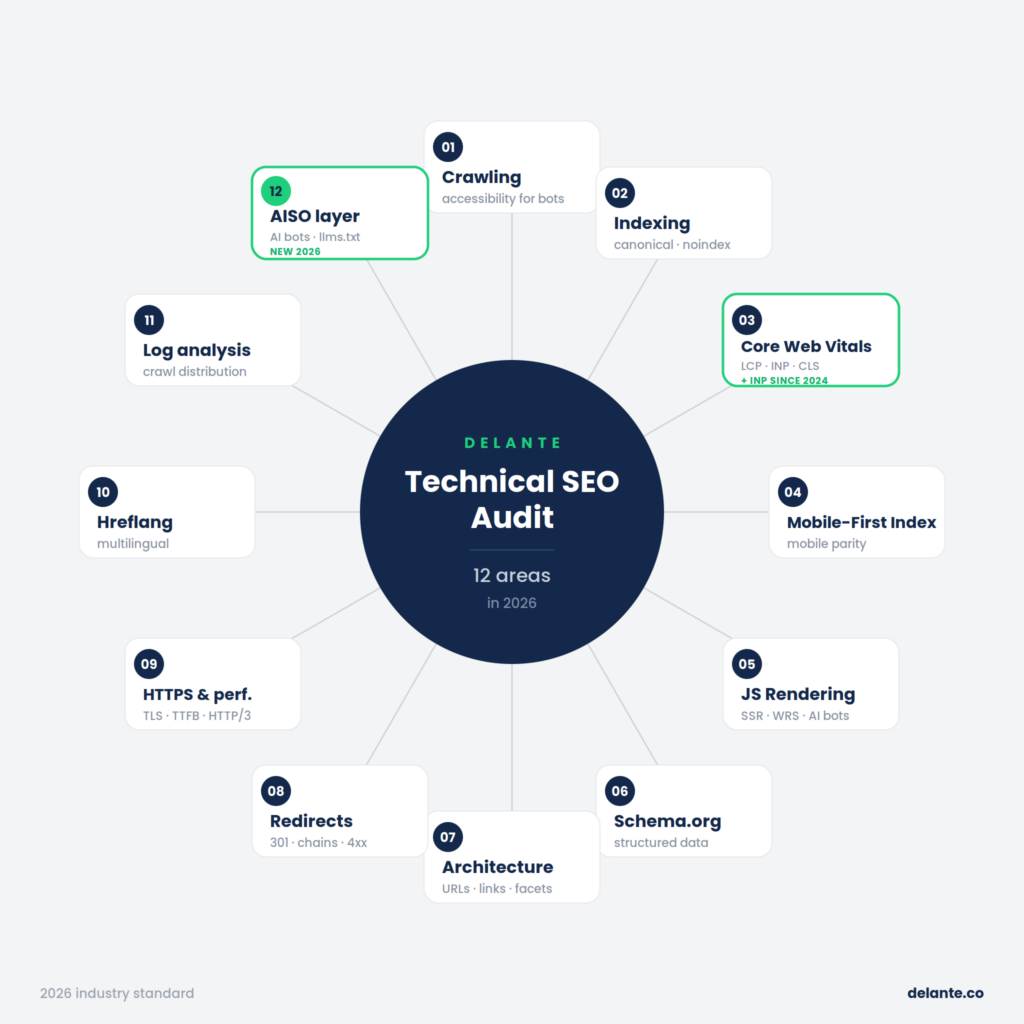





 Damian Hliwa