
The optimal website loading time
The answer to the question about the most optimal loading time of a website is simple - the faster, the better. Here, there is no way to gild the lily. But generally speaking, according to the recommendations, a website shouldn’t load longer than 2 seconds. Every additional second will increase your bounce rate. In order to avoid it, we’d like to present you the tools that will help you to estimate how fast your site is. Moreover, most of the aforementioned tools will also suggest you what needs to be done to improve your website loading time. Of course, it’s worth following these recommendations but remember to monitor how the speed parameter changes after the modifications - use the same tool to do it as different tools apply different measurement methods and using the same tool at all times will increase the reliability of the conducted test.Measuring website loading time - the tools:
1. Google PageSpeed Insights
A tool designed by Google to measure website load time on both mobile and desktop devices. It offers tips and suggestions on what should be done or improved and how to do it. The tool uses a point scale from 0-100, and the higher the indicator the better. If you manage to achieve more than 85 points you don’t need to worry about your website. Additionally, Google PageSpeed Insights provides UX recommendations. It’s available at: https://developers.google.com/speed/pagespeed/insights/?hl=en. In November 2018, Google presented a completely new measuring machine for PageSpeed and it’s based on Lighthouse, an open-source tool.
2. GTmetrix
It’s a simple tool that gives you the possibility to purchase a premium plan, although it’s not necessary if you want to test only one website. It shows the total loading time of the page, its size, the number and description of requests. The data are presented in the charts which make it easier to comprehend the information provided by GTmetrix. As the tool is extremely intuitive, it shouldn’t constitute any problems to beginners. Many people consider GTmetrix to be one of the best tools as it presents very realistic results. The tool offers also some extra (paid) functions such as a video recording of the website loading. The only downside to GTmetrix is that in order to perform the test you need to queue up. If you’re lucky, it’ll take only a few moments, if not, you may need to wait a long time. GTmetrix offers a few options of testing your website loading time - one of them is done from the Google perspective, the other one from the Yahoo!. Each of them has its own guidelines according to which the website is accessed. The Waterfall tab is a list of requests and information concerning how these requests affect the page loading time.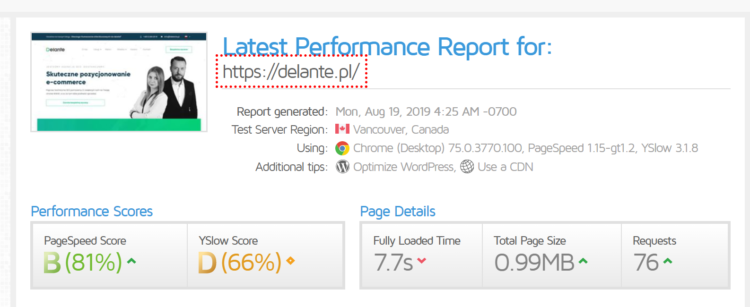
3. Yahoo’s YSlow
Yahoo's YSlow scans the page components and on their basis examines the website loading time. The data are presented in graphics and charts. It also informs which areas require any intervention of the website administrator. If you click on the displayed errors, you’ll be provided with recommendations on how to solve them. The tool comes in the form of a plugin that can be used in Firefox, Chrome, Opera and Safari.
4. WebPage Test
The tool assesses website loading time with the use of various browsers from different parts of the world and shows the actual connection times. It provides valuable information such as performance diagnostics (e.g. the image of the initial loading of the website), resource charts and suggestions for improvements. The tool tests the website three times and only then gives the average value, therefore measuring your site loading time with its use takes noticeably longer. However, the data are very accurate, shown in diagrams and screenshots. This tool also requires queueing up which prolongs the process. It gives you the possibility to specify whether you want to check your page loading time on mobile or desktop devices. The test is divided into several categories and you get a score in each of them. After you click on the score, you’ll see statistics and explanations as to why your site has been evaluated in this particular way.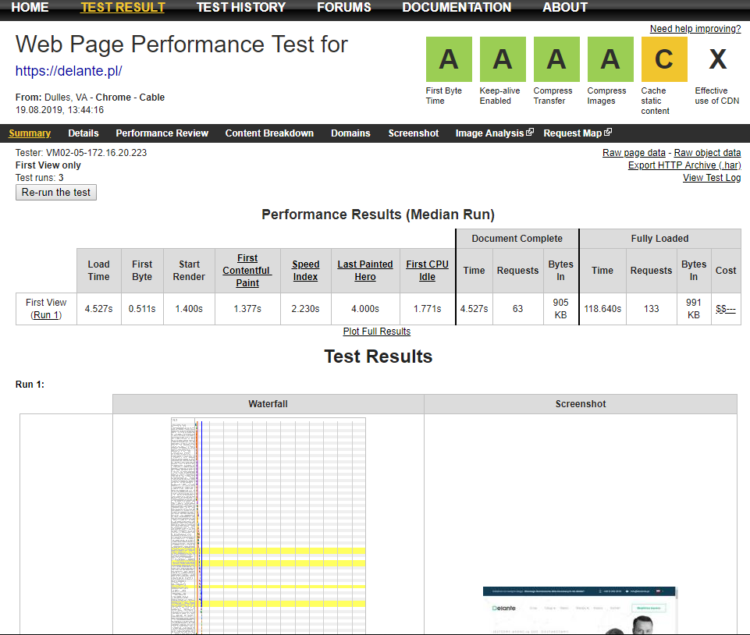 Although the obsolete layout may scare you off, the amount of expertise provided by this tool turns out to be invaluable.

5. DareBoost
It’s an advanced tool for testing your website loading time, monitoring network performance and analyzing your site in terms of its speed, SEO and security. 5 tests a month are for free and it’s more than enough to optimize your page. It enables you to display and check which technologies have been implemented on the website.
 After clicking on the arrow it’ll be explained to you why this particular aspect is important for the website.
6. Load Impact
Load Impact offers 10 tests a month for free. The premium plan, which costs $119 per month, enables you to examine your website as many times as you wish. The test is based on creating artificial traffic to the site and checking how it responds to such overload. The website is “visited” by 1 million users from different parts of the world at the same time.
7. Chrome Dev Tools
It’s a tool to audit the performance of your website. It informs you about the aspects that need to be improved and displays the lines of the CSS code which are inefficient. [caption id="attachment_15358" align="aligncenter" width="750"] Source: https://developers.google.com/web/updates/2017/05/devtools-release-notes#lighthouse[/caption]