September Marketing Checklist: 10 Website Checks Before the Q4 Traffic Surge

10min.

Comments:0

13 August 2026

September Marketing Checklist: 10 Website Checks Before the Q4 Traffic Surge
September is your last window of opportunity to ensure your website is ready for the Q4 surge in demand. Now is the time to remove purchasing friction, verify site performance and data tracking, and confirm your product offer is properly optimized and accessible across traditional Search and AI engines.

10min.

Comments:0

13 August 2026

September Marketing Checklist – Key Information

  • September is a good time to review your analytics, conversion paths, and website performance before increasing marketing budgets for Q4.
  • Top priority should be given to issues that could block transactions, distort revenue tracking, or reduce CR and ROAS. Other changes can be prioritized according to their business impact.
  • Q4 website readiness now also includes consistent product data, accurate promotional information, digital accessibility, and the visibility of your offering in Search and AI-generated answers.

Why Is September a Good Time to Review Your Website Before Q4?

Removing barriers from the conversion path rarely comes down to a single task in a ticketing system. In practice, it requires a complete decision-making process: from diagnosis and business impact assessment, through prioritizing development work and QA testing, to re-analyzing the data and verifying the impact on other website modules.

September is the last opportunity to make complex optimization decisions while maintaining full operational control. In October, team resources shift toward campaign preparation and content infrastructure. By November and December, any major changes to critical areas — such as checkout, server-side analytics, or key API integrations — carry a disproportionately high risk of downtime and revenue loss.

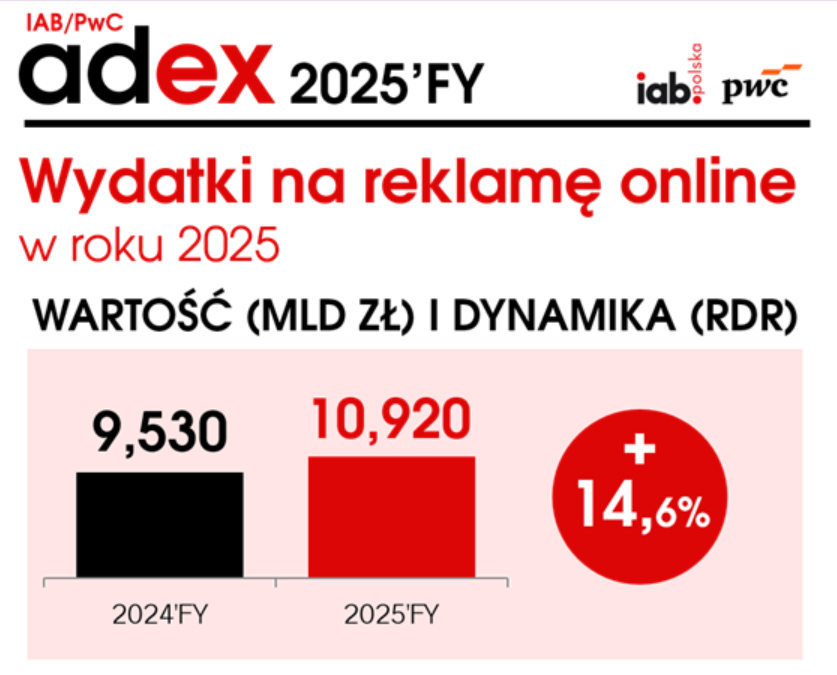
This is particularly important as digital budgets continue to grow. According to IAB Polska, the value of Poland’s online advertising market increased by 15% in 2025, reaching nearly PLN 11 billion. The more a company invests in generating demand, the higher the cost of every barrier customers encounter later in their journey.

online advertising spend 2025

Source: IAB Polska/PwC AdEx study for the full year 2025

What Should You Check on Your Website Before Q4?

Higher sales volumes in Q4 can quickly expose weak points across your website. Issues that previously had little impact can become real barriers to transactions as demand and website load increase.

September is the time to identify and resolve them, before every website change starts carrying greater risk.

1. Can You Trust the Data You’ll Use to Evaluate Q4?

Before Q4, check whether your data captures the entire user journey – from landing on the website to completing a purchase or submitting a form. A dashboard may look accurate even when some transactions are recorded incorrectly or disappear between systems.

At higher sales volumes, these discrepancies make it harder to determine where your website is actually losing customers and revenue.

What Should You Check in Your Analytics Before Q4?

  • whether GA4 is tracking your most important business events,
  • whether transaction volume and value match your e-commerce platform or CRM data,
  • whether conversions are being missed or duplicated,
  • whether checkout, payment processes, or website changes are disrupting tracking,
  • whether your consent mechanism is working correctly,
  • whether marketing and sales teams use the same definitions of transactions, leads, and revenue.

The biggest challenge isn’t always missing data. A more serious risk arises when the data looks reliable but provides an incomplete picture of user behavior.

That’s why you should test your tracking in practice before Q4: go through the entire user journey yourself and verify that each consecutive action is being recorded correctly.

Can You Trust Your Data?

We’ll verify your GA4 configuration.

Set Up Analytics
Tomek Gniecki
Tomek Gniecki SEM & Analytics Specialist

2. Can Customers Complete the Entire Journey from Landing Page to Conversion?

Investments in demand generation (SEO, PPC, AISO) lose value when users encounter barriers within the website infrastructure. Analyzing marketing channels, checkout performance, or analytics accuracy separately creates an illusion of optimization. Users do not interact with separate technology modules. They move through one continuous journey.

That’s why you should test the entire process before Q4:

Search / AI → landing page → offer → product → cart or form → checkout → payment → confirmation.

How Should You Test the Transaction Journey Before Q4?

  • Start with a real traffic source: enter the website as a user would, preserving the parameters attributed to that source.
  • Test desktop and mobile: complete the most important action on both devices and look for elements that could prevent users from moving forward.
  • Complete the entire checkout process: place a test order or submit a form, checking the payment process and other integrations as well.
  • Check post-conversion messages: verify the confirmation page and messages sent to the user.
  • Compare the data: make sure the purchase or lead has been recorded correctly in your analytics and CRM.

3. Is Your Mobile Experience Ready for a Higher-Sales Period?

Evaluating mobile performance shouldn’t end with checking responsiveness. As sales volumes increase, what matters most is whether users can quickly find a product, use filters, complete a form, and finalize a purchase.

Core Web Vitals can help identify barriers related to loading speed, responsiveness to user interactions, and visual stability. However, a good technical score alone doesn’t mean the entire mobile journey is frictionless.

What Should You Check on Mobile Before Q4?

  • Website performance and stability – LCP, INP, and CLS for real users.
  • Navigation and search – menus, search functionality, filters, and sorting.
  • Purchase journey – product pages, forms, cart, checkout, and payments.
  • Elements that overlap content – pop-ups, banners, and cookie notices, especially near CTAs.

PageSpeed Insights can identify a technical barrier. However, it won’t tell you whether users can comfortably complete the entire journey and finalize a purchase on their phones.

For a broader analysis, compare these observations with the SEO ranking factors checklist and prioritize changes according to their impact on user experience and sales.

4. Is Your Website Ready for Increased Load?

Higher demand in Q4 means more users, database queries, and checkout operations happening at the same time. A website that performs flawlessly under normal conditions may slow down under heavier load precisely when users are closest to making a purchase.

What Should Your DEV Team Check?

  • The most important elements of the purchase journey – product pages, cart, checkout, and forms.
  • Third-party integrations – payment systems, shipping providers, CRM, and APIs.
  • Cache and CDN – particularly when prices, promotions, and product availability change frequently.
  • Third-party scripts – their impact on website speed and functionality.
  • Website performance under increased load – including scenarios with many concurrent users.
  • Monitoring and alerts – so the team can quickly identify performance drops or errors.

When recommendations remain in a document and never reach implementation, the website is left with the same limitations. That’s why at Delante, our developers work directly with SEO, UX, and analytics specialists, allowing us to move from diagnosis to implementation before Q4.

5. Can Google Find the Pages Driving Your Q4 Sales?

Before the season starts, the number of URLs in the index tells you very little on its own. What matters more is whether Google can access the categories, products, and landing pages that have the greatest impact on Q4 sales.

What Should You Check First?

  • Indexation of sales-focused pages – especially categories, products, and landing pages prepared for Q4.
  • Accessibility for Google – robots.txt, noindex directives, and canonical tags.
  • Internal linking – whether important parts of your offering are accessible through the website structure rather than only through search or filters.
  • XML sitemap – whether it contains up-to-date URLs that should appear in Google.
  • Seasonal pages – what happened to landing pages from previous years and whether their potential can be leveraged again.
  • Discontinued products and categories – whether they direct users and Google to the current offering.

Google indicates that website structure and internal linking affect Googlebot’s ability to discover pages. That’s why, before Q4, it makes sense to assess indexation through the lens of the offering that is expected to generate sales, rather than the number of issues identified.

You don’t need to fix everything before Q4. The SEO Audit Checklist helps identify the barriers that can have a real impact on sales.

6. Is Google Receiving Accurate Information About Prices, Availability, and Products?

In e-commerce, Google receives product information from several sources: your website, structured data, and Google Merchant Center. If the price, availability, or product variant differs across these sources, Google receives an inconsistent view of your offering.

This becomes particularly important before Q4. Prices and inventory levels change more frequently, and outdated information can limit product exposure or direct users to an offer they can no longer purchase.

Offer ElementE-commerce WebsiteStructured Data (JSON-LD)Google Merchant CenterDecision-Making and Operational Risk in Q4
Gross Price / PromotionsAd disapproval, lower CTR, or checkout abandonment when users encounter a price discrepancy.
Stock AvailabilityWasted advertising budget on clicks for out-of-stock products.
Variant (Color/Size)Users being directed to the wrong versions of a product page.
Product Name and Unique DescriptionLoss of visibility for intent-driven queries and in AISO (LLM) systems.
Identifiers (GTIN/EAN)Performance Max campaigns being suspended due to product matching errors.

7. Are Your Promotional Mechanisms Compliant with the Omnibus Directive?

Preparing a discount policy for peak sales periods such as Black Friday and Cyber Monday goes beyond creating banners and implementing discount codes. Automating pricing rules, discount calculations, and the display of the lowest price from the previous 30 days requires precise technical validation before launching a campaign with a high media budget.

What Should You Check Before Launching a Promotion?

  • Price and discount value – whether the discount is calculated and displayed correctly.
  • The lowest price from the previous 30 days – whether it appears in the correct place and is calculated accurately.
  • Discount codes and combined promotions – whether discounts overlap in unintended ways.
  • Price consistency – whether users see the same offer on the landing page, product page, and in the cart.
  • Automated price changes – whether the mechanism works correctly when the promotion starts and ends.

An error in the promotional mechanism can mean more than customer dissatisfaction. At scale, it can affect margins, brand credibility, and legal risk.

8. Does the Purchase Process Meet Accessibility Requirements?

Before Q4, it makes sense to start with areas directly related to the purchase process. If a user cannot select a product variant, complete a form correctly, or proceed through payment, an accessibility barrier also becomes a sales barrier.

Since June 28, 2025, the Polish Accessibility Act has also applied to e-commerce.

Accessibility is therefore more than an element of good UX. For many companies, it also involves specific legal obligations.

Which Parts of the Customer Journey Should You Check First?

  • Navigation and search – whether users can operate them efficiently using a keyboard as well.
  • Product pages – variant selection, readability of information, and accessibility of interactive elements.
  • Forms and checkout – field labels, validation, and clear, understandable error messages.
  • Cart and payments – whether users can complete the entire process without accessibility barriers.
  • Interface readability – including contrast, visibility of active elements, and logical navigation order.
  • Assistive technologies – whether the most important elements of the process are interpreted correctly by assistive technologies.

Is Your Website Accessible?

Identify the barriers that make your website difficult to use.

Accessibility Audit
Damian Hliwa
Damian Hliwa Head of SEO

9. Does the Landing Page Match User Intent?

A technically sound website isn’t enough if users land on the page and don’t find what they were looking for. A mismatch between user intent, the message displayed in Search or AI, and the content of the landing page can interrupt the journey before users even evaluate the offer.

Before Q4, check not only the landing page itself, but also the continuity between what users are searching for, what they see before clicking, and what they find on the page.

How Should You Evaluate a Landing Page Before Q4?

Journey StageKey Question and Business PerspectiveRisk Factor (Impact on Q4 Performance)
IntentWhat is the user looking for at this specific moment (transaction, comparison, information)?An intent mismatch results in the immediate loss of paid traffic.
Message (Ads/Search)What specific promise (price, availability, solution) was made in the ad creative?Message inconsistency lowers Quality Score and drives up CPC.
Landing PageIs the context established by the ad immediately confirmed above the fold?A lack of continuity in the user journey causes potential customers to leave for competitors.
OfferDoes the page provide all the information required to make a purchase decision?Missing information (e.g. reviews, specifications, or delivery details) can prevent conversion.
Call to Action (CTA)Is the next step in the journey clear and free from distractions?Competing or unclear CTAs distract users and create friction in the decision-making process.
ConversionCan users complete the transaction or submit the form without technical friction?Cart or checkout errors directly reduce sales performance.

10. Is Your Offer Clear to AI Systems as Well?

Before Q4, it’s worth checking not only whether Google understands your offer, but also whether AI systems can interpret it correctly. According to the “E-commerce in Poland 2025” report, 53% of surveyed internet users use AI tools during the purchasing process, while 19% do so frequently.

What Should Be Clear to Search and AI?

  • Offer – what the product or service is and who it is intended for.
  • Use case – in which situations it addresses the user’s needs.
  • Differences – what sets it apart from other available options.
  • Specifications – variants, specifications, price, and availability.
  • Relationships – connections between products, categories, and services.
  • Credibility – information that demonstrates the brand’s experience and authority.

Structured data helps search engines interpret website content, but the technical layer alone isn’t enough. Your content should provide specific information that AI systems can use when comparing offers and answering users’ questions.

Before Q4, the question is no longer simply: “Can users find our offer?” Increasingly, you also need to ask:

“Does our brand appear when users ask AI to compare options, recommend a solution, or help them make a choice?”

Operational and Decision-Making Triage Before Q4

Before Q4, the list of changes is almost always longer than the time your team has available. That’s why not every issue should be given the same priority.

What Should You Check?Business ImpactPriority
Transaction journey functionalityAn issue with a form, cart, delivery selection, or payment process can completely block conversion. Scaling budgets in this situation directly erodes margins.P0
Measurement consistency and reliability (GA4, Ads, CRM)Data discrepancies prevent accurate ROAS assessment and budget allocation. Management decisions are then based on a distorted view of channel performance.P0
Consent Mode v2 and CMP integrationMissing or incorrect consent signals degrade attribution models and bidding algorithms across paid media.P0
Accessibility of key categories and products to botsIndexation of assets responsible for a significant share of margin can determine whether annual sales targets are achieved.P1
Mobile performance across the purchase journey (Mobile-First UX)Friction on mobile devices reduces conversion rate (CR) precisely when user acquisition costs (CPC/CAC) are increasing.P1
Server infrastructure resilience under increased loadPerformance degradation or downtime during peak campaign periods results in immediate and unrecoverable revenue losses.P1
Synchronization of prices, availability, and structured dataDiscrepancies between the store, Schema, and Merchant Center can trigger product campaign (PMax) disapprovals and reduce ROAS.P1
Presentation of price reductions (Omnibus Directive)Incorrect discount calculations or failure to display the lowest price from the 30 days preceding the reduction creates direct exposure to financial penalties and reputational damage.P1
Compliance of critical elements with accessibility requirementsDigital accessibility combines legal compliance risk with the ability of a broader group of customers to complete transactions without barriers.P2
Intent alignment on landing pagesA mismatch between the promise made in an ad and the content of the landing page increases bounce rates and drives up CAC.P2
Structuring offer information for AI Search Optimization (AISO)Providing bots and LLMs with clear, unambiguous product information influences Share of Answer and brand presence across alternative discovery journeys.P2
Early publication and readiness of seasonal contentPublishing landing pages too late limits the time available to build domain authority and secure indexation before peak demand.P2

How Should You Interpret P0, P1, and P2 Priorities?

  • P0 — a prerequisite for safe scaling: areas that can directly block sales or undermine the reliability of the data needed to evaluate performance.
  • P1 — to be resolved before the Q4 peak: elements that, at higher scale, can affect conversion, website stability, or legal risk.
  • P2 — growth potential: initiatives that strengthen brand exposure across Search and AI and prepare the website for further growth.

Instead of collecting separate recommendations from multiple teams, you can assess your website’s Q4 readiness through a single process. Delante experts in SEO, UX, analytics, AISO, and development will identify which barriers require action before the peak sales period and help move from diagnosis to implementation.

Sources

Author
Paulina Ogórek - Junior SEO Specialist
Author
Paulina Ogórek

SEO Specialist

Paulina holds a degree in Information Management and Digital Publishing, as well as a Master’s in Social Economics. During her studies, she was actively involved in the Scientific Circle of Information Architects, where she explored the fields of UX and UI.

Author
Paulina Ogórek - Junior SEO Specialist
Author
Paulina Ogórek

SEO Specialist

Paulina holds a degree in Information Management and Digital Publishing, as well as a Master’s in Social Economics. During her studies, she was actively involved in the Scientific Circle of Information Architects, where she explored the fields of UX and UI.