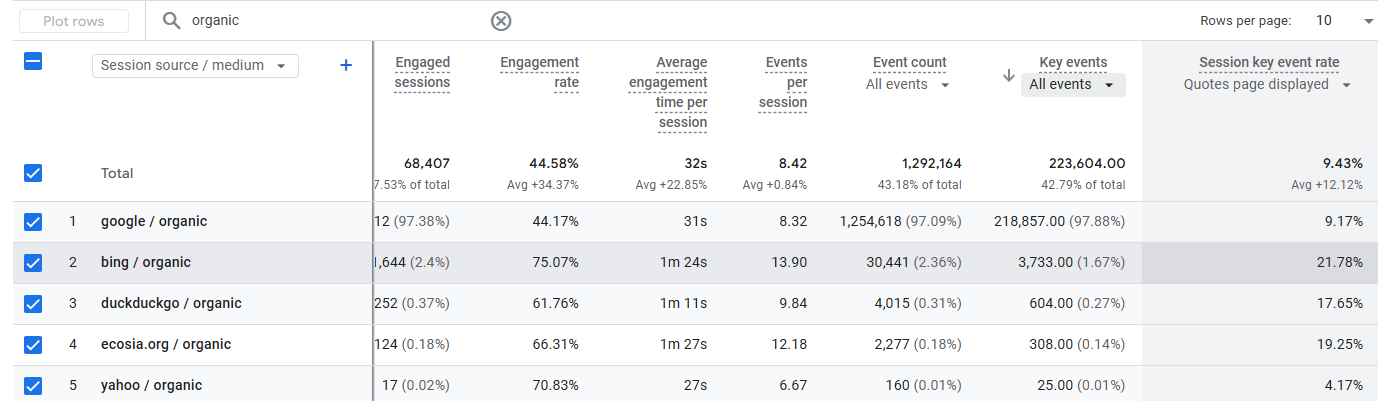
So, does it mean you should completely revamp your SEO strategy if you want to become visible on Bing? Luckily, it doesn’t. The good news is that the basics of search engine optimization are similar for both Bing and Google.
Yet, there is a couple of things you should have in mind while doing SEO for Bing.
Bing SEO – Are there any differences from SEO for Google?
Doing SEO for Bing isn’t worlds apart from optimizing your website for Google. Still, the ranking system used in both search engines differs a bit. You may have even seen for yourself that Google and Bing get you completely different results for the same query. Bing seems to be a bit more literal, almost straight-up. It’s so strikingly obvious that people started making memes about it:
Why is that? In general, Bing’s algorithms focus more on the exact keyword match rather than on semantics and context, which is typical of Google.
This means that – and here comes the first piece of SEO for Bing advice – you need to run a separate keyword research if you want to rank on Bing. Using the analytical data on keywords provided by Google Search Console isn’t the best option as this tool bases the reports on the searches made on Google.
This means that you will go a lot further if you devise your Bing SEO strategy using the Bing Webmaster Tools reports – Bing’s alternative to Google Search Console.
This means that if you want to rank high on Bing, you may consider changing your approach slightly. Separate keyword research is just one thing, and we will explore this aspect in more detail later.
Other differences?
Desktop-first indexing
Desktop-first indexing is the first difference. Unlike Google, which uses mobile-first indexing, Bing still prioritizes the desktop version when evaluating a website.
JavaScript Support
The second important aspect is JavaScript support. Bing handles it much worse than Google. Pages that rely on dynamically loading content via JS (e.g., e-commerce sites with an asynchronous catalog) may struggle with proper indexing. The HTML version of the page should be as “readable” as possible for bots.
User Engagement Metrics
One characteristic feature of Bing SEO is that the search engine heavily takes into account user engagement metrics, including dwell time, which is the time spent on a page after clicking on a search result. If someone stays on your page longer and doesn’t immediately return to the search results, it’s a signal that the content is valuable and may interest the user.
How to improve these metrics? The content must captivate from the first paragraph, CTAs should not feel forced, and the page structure should be user-friendly, allowing users to easily navigate through all stages of the buying journey.
And know, let’s discover other factors that help you improve SEO for Bing.
Bing SEO – How to Optimize for Bing?
Write Quality Content
The truth is, no matter the search engine you optimize your website for, quality, user-oriented and SEO-friendly content always plays first fiddle. Interestingly, Bing seems to prefer long-form pieces of writing that managed to build some reputation among users. Whereas Google appears to have a thing about fresh and updated content, Bing favors older, more “established” articles.
While talking about content and SEO for Bing, you must also realize that keywords play a huge role here. Not only should they be placed in strategic places (more on that later), but also your opening paragraphs ought to be sprinkled with the key phrases. Naturally, don’t overdo it so as not to discourage your visitors from reading your post or article, thus leaving your website mercifully fast. And this may happen if every other sentence features the same keyword.
Surprisingly, the increased density of keywords in the so-called above-the-fold section of your website may be considered suspicious, not to say spammy, for Google. Bing, on the other hand, seems to favor such pages. Yet, again, make sure you don’t go overboard with stuffing the keyword phrases as this may increase your bounce rate.
Naturally, keyword stuffing isn’t the sole reason why people leave a website within the first few seconds. If your visitors seem to be quick to close your site, which ruins your SEO obviously, here you can find a couple of ideas on how to reduce the bounce rate.
While creating quality content for Bing, it’s worth noting that this search engine gives a special stamp of approval for texts enriched with all sorts of multimedia: videos, infographics, and images. This means that if you want to rank high on Bing, you need to…
Use High-Quality, Relevant Images & Videos
Writing a compelling and informative article may not be enough for Bing to show your website at the top of search results. Interestingly, the presence of images, videos, and other types of multimedia content helps you to rank higher on Bing. Google, however, doesn’t consider multimedia content to be an influential ranking factor.
In other words, whereas Google lays great emphasis on text, Bing seems to rely more on multimedia content. Having this in mind, you should introduce more high-quality visuals and audio into your content strategy for Bing.
One of the reasons why multimedia content plays such a significant role in SEO for Bing is Visual Search. Its algorithms are trained to crawl, understand, and accurately index visual and auditory content. It can’t be denied, Bing is on the leading edge when it comes to providing outstanding search experience for images.
Double-check the size of the media content published on your website. You need to make sure your website loads fast and doesn’t irritate visitors with unexpected layout shifts. Such issues also impact the website ranking, no matter the search engine you’re trying to optimize your site for. You may find some clever and immensely useful tips on optimizing visual content and improving loading speed in how to check Core Web Vitals.
While adding multimedia content, always make sure you provide descriptive filenames and titles. Also, work on your alt texts so that they provide a clear understanding of what the image represents.
Last, but absolutely not least, if you still have a Flash website*, your chances of ranking high on Bing are pretty high. This is primarily because Bing – again – is really good at interpreting graphic content.
* Flash websites use animation, graphics, and slideshows. The thing is that some search engines fail to read the written content published on Flash websites.
So, when you craft a people-first piece of writing and accompany it with visual content, you may try to…
Encourage People to Leave Reviews
Consumers rely on reviews, no doubt. Positive online consumer ratings and reviews can contribute to the growth of your brand presence on Bing. However, how can you possibly encourage your clients and customers to leave a review on Bing since it removed the “Write a review” for business listings?!
Here comes another big difference between Google and Bing. Bing uses other reputable platforms’ review sections, such as TripAdvisor, Yelp!, and Facebook, and displays them on the First Page.

Source: Delante’s own screenshot

Source: Delante’s own screenshot

Source: Delante’s own screenshot
This basically means that you need to register and create business pages on the most popular review platforms. Considering the niche and industry you work in, you may try getting more reviews on the following platforms:
- TripAdvisor
- Booking.com
- Facebook
- FourSquare
- Yelp!
- Restaurantji
- Groupon
- Vagaro
- Chamberofcommerce
- Yellowpages
- Birdeye
- MerchantCircle
- Judy’s Book
Naturally, for each niche and industry, there are separate customer review platforms. That’s why don’t limit yourself to the ones listed above.
The more reviews you gather on various platforms, the better your local SEO on Bing will perform. And the better local SEO on Bing, the higher visibility in Search.
You already know that using Bing WMT should be considered absolutely essential for keyword research. As you may have guessed, this isn’t the only feature the Microsoft tool has to offer to those who want to become visible on Bing.
Like Google Search Console, Bing Webmaster Tools allows you to monitor your website performance, resolve potential malware issues and handle indexing.

Source: Delante’s own screenshot
Without having access to the Microsoft tool, you won’t be able to verify whether Bing’s crawlers have indexed your site – and that’s pretty fundamental, right? Bing Webmaster Tools also lets you submit new pages for indexing as well as remove content from the index, which is also important from the SEO viewpoint.
Here is how to index your website on Bing:
STEP 1 Go to Bing Webmaster Tools.

Source: Delante’s own screenshot
Click the Sign In button.
STEP 2 You are asked to add your website to Bing WMT. You can do this either by importing your website from Google Search Console, which is super convenient provided you use this tool already. If your website hasn’t been indexed yet, add your site manually by inserting its URL. Either option works fine.

Source: Delante’s own screenshot
That’s it. Bing Webmaster Tools starts indexing your website.
If you want to speed up the process a bit, or index newly added pages, you may consider using the IndexNow option. You can find it on the left sidebar.

Source: Delante’s own screenshot
As advised on Bing Webmaster Tools help & how to:
Use IndexNow API or the Bing URL or Content Submission API to instantly reflect website changes. If you are unable to adopt the APIs, we recommend submitting the updated URLs directly through Bing Webmaster Tools or by including them in your sitemap.
Sorting your web content helps you rank higher in search results. When crawlers understand what a particular page is about, they simply consider your website well-organized, thus rewarding you with higher ranks. Additionally, Tags and Categories make it easier for your visitors to find the page they are searching for. It can be said that those two elements improve both UX and SEO.
For those who aren’t sure what Tags and Categories are and what they represent:
First thing, you can find Tags and Categories in WordPress. Their prime function is to group similar articles and posts together both for crawlers and users.
Categories’ main aim is to add general labels to your content. For example, if you sell food products, your Categories would be dairy, snacks, beverages, vegetables, and fruit. On our blog, the Categories look like this:

Source: Delante’s own screenshot
Tags, in turn, are used to define specific details of each of your articles. Again, if you sell food products, your tags under the “Diary products” category would be milk, yogurt, cheese, review, product description, and how-to. Basically, you can add a few tags to one page.
It’s worth realizing that while Categories can be seen on a website (in breadcrumbs or in the table of contents), tags are rather hidden (but not always).
Both elements are indexed by Bing, which is beneficial for you as this brings more organic traffic to your website. Once you determine which Tags and Categories are the most popular among your audience, you may start creating more similar content to attract even more visitors.
If you would like to broaden your knowledge of Tags and Categories or learn how to add them to your pages, be sure to check Categories and Tags on the Blog.
Another thing you may consider doing to help your website perform better on Bing is to….
While doing SEO for Bing, make sure each of your pages has descriptive and unique meta descriptions. If you fail to provide Bing with titles and meta descriptions featuring keywords, these two elements will be created by algorithms.
You shouldn’t let the bots do this job for you because they will never manage to represent or summarize the contents of your individual pages adequately. Also, algorithm-written metadata will neither help your website stand out in search engine result pages nor connect your brand with potential prospects.
Since you have the ability to control metadata, why wouldn’t you take this opportunity? Use the title, descriptions, and URLs to tell your target audience that the content they’re looking for is waiting for them on your website. Page descriptions (aka meta descriptions) should be made up of around 130-150 characters.
When it comes to page titles, they should indicate the main topic of a page. The tricky part is that you should get the message across using from 55 to 70 characters.
Luckily, Microsoft Webmaster Tools helps you identify the areas of your website that would use some fixing. Just open the tool and click SEO Reports to see a list of things that may improve your website performance in Bing if you find time to work on them.

Source: Delante’s own screenshot
By taking this extra effort to customize your metadata and saturating it with relevant keywords, you help Bing comprehend your web content. This is extremely crucial if you want to rank high on this search engine.
If you want to understand the concept of metadata fully and exploit its potential for improved SEO, read How to Add Meta Tags in WordPress.
Obviously, adding keywords to meta descriptions and scattering them all over your website, may not help you much unless you know which phrases you should exactly use. In other words, to rank high on Bing, you need to…
Use Relevant Keywords
Relevance of your content is extremely important for both search engines. The thing is that while looking for this relevance, Bing seems to take things, meaning queries, more “literally” than Google. This means that you need to be uber-precise while defining and using your keywords while doing SEO for Bing. Why is that?
Generally speaking, Google is more advanced in terms of understanding context and semantics. For the same reason, Bing is less effective at interpreting complex queries. Therefore, the latter search engine relies more on an exact match to answer their user’s queries.
For example, if a user types a question into the search bar, e.g. “How to treat melanoma at home,” Bing is more likely to show them a page where somebody has already used the exact same wording. Google, however, focuses more on understanding and interpreting contextual cues, which in this case would probably result in telling the user to seek professional medical advice.
In short, Google scans your website for topical relevance. Bing looks for an exact keyword match.
That’s why, if you want to rank high on Bing, you need to use Bing Webmaster Tools to run a separate keyword research.
When you finally get the new list of keywords, you need to use them wisely in your optimization process. To do so, you may consider applying the following tips.
TIP #1 Exact match domains perform better on Bing. However, if you already have a domain, that’s also okay. Just make sure the URLs include the keywords you discovered in Bing Webmaster Tools.
TIP #2 Include the exact match keywords in fundamental areas such as metadata, headings, and the first paragraph of each page, and of course, in the web content – keyword placement is very important to do well on Bing.
Take our Local SEO Services, for example. Notice where the main keywords of the page are inserted.

Source: Delante’s own screenshot
TIP #3 Try not to use more than 3 keywords to optimize a single page.
TIP #4 While doing all of the above, try not to throw the keywords everywhere you possibly can in an attempt to improve your website’s ranking on Bing. Increase the exact match keyword density cleverly and carefully, without harming your ranking on Google.
Build a Quality Backlink Profile
Improving your ranking through acquiring inbound links matters for both search engines, yet Google and Bing seem to use separate backlink profile evaluation systems.
For Bing, quality is determined by how long a website has been registered in its index. This means that you’re more likely to improve your backlink profile if you manage to acquire referring links from websites that are “older” than yours.
If it’s hard for you to get a backlink from a well-established and long-standing website, you may try to change your link building outreach a bit. Reportedly, Bing seems to favor domains with .edu, .org, and .gov extensions, so being featured on such websites increases your chances of boosting your backlink profile too.
Use Schema Markup
Schema markup is another element that helps Bing understands your web content. You can use it to specify various pieces of information, including your business name, the author of an article, the date of an event you organize, a review, and a price of a product you offer in your e-commerce store.
Additionally, adding schema markups in your code positively contributes to the click-through rate.
At Bing, enabling users to make key decisions through visually appealing, information-rich search results is a key component of our search experience. As a content publisher, you can contribute to – and stand out in – this experience by annotating your structured content using any of the following supported specifications:
- Schema.org (HTML Microdata, JSON-LD)
Source: Bing Webmaster Tools help & how to
This way you make the search result richer, which performs better at grasping users’ attention. Just take a look at schema markup in the wild:

Source: Delante’s own screenshot

Source: Delante’s own screenshot
Be Active on Social Media
Unlike Google, Bing uses social media signals – shares, likes, followers – for ranking. Microsoft notes that content published by influential brands is more likely to be commented on and shared. This, in turn, contributes to a higher follower count, which again makes this brand’s content more widespread. For Bing, this is one of the key organic traffic rankings.
Being active on social media and engaging with your audience can skyrocket your website ranking on Bing. Especially, if you manage to acquire many new followers in a relatively short time span. Growing your audience is one thing. You must also work on encouraging your followers to interact with your content because user engagement matters for Bing as well.
Not sure how to boost your brand’s presence on TikTok? Be sure to read 12 Things You Should Know to Increase Your Content Reach.
This means that including social media marketing in your marketing strategy would have a positive effect on your Bing SEO.
DID YOU KNOW that apart from Bing, Microsoft also owns LinkedIn? Keep this in mind while drawing up your social media strategy to promote your website presence on Bing.
Claim Your Listing on Bing Places for Business
Just as Google My Business helps add credibility to your brand on Google, Bing Places for Business does the same, but on Bing, obviously. It’s worth realizing that without a registered and verified business profile, you have little to zero chances of appearing at the top of Bing for local searches. Neither will you appear on Bing Maps.
If you want to get visible on Bing, you should definitely set up your listing. The entire process is pretty straightforward and free, so there is absolutely no reason for you to lose this opportunity of reaching local searchers.
Bing vs Google – What’s the Difference?
Well, the most striking one is the market share:
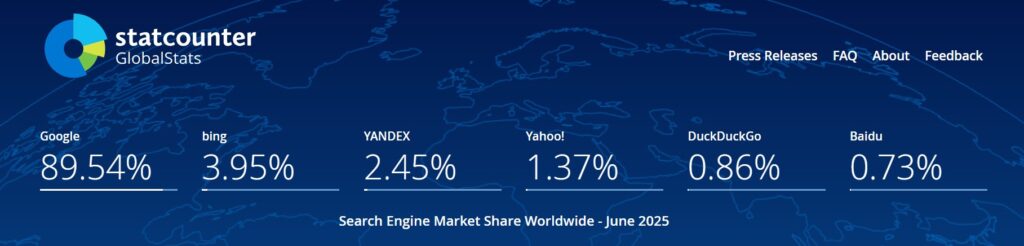
Source: Global Stats
When it comes to more SEO-related issues, it’s good to know the crawling behavior of Bingbot. Bingbot, Microsoft’s web crawler, does index entire websites, including all linked pages. However, it has been observed that Bingbot may prioritize crawling and indexing certain pages over others. For instance, it might focus more on the homepage and top-level pages, especially for larger sites. This approach can lead to claims that Bingbot emphasizes the main page and the first 100KB of other pages. Nonetheless, this is not a strict rule, and Bingbot does crawl and index the full website, albeit with potential variations in frequency and depth depending on factors like site structure, content freshness, and crawl budget.
Another distinguishing feature is the domain name. Since Bing is better at recognizing exact matches, you increase your chances of winning top spots on this search engine if your domain name isn’t your brand name. Interestingly, this works exactly the opposite on Google, as this search engine prefers brand-name domains. The main reason for that may be the dishonest attempts that some business owners used to do to rank high on Google. In plain English, they used to clutter Google with spammy websites.
If you feel like diving deeper into this subject, be sure to read Google vs Bing. How Do Search Engines Work?

The Benefits of Bing SEO
One of the undeniable benefits of doing SEO for Bing is that it doesn’t differ that much from doing SEO for Google. This means you don’t need to go through the whole search engine optimization process from the very start. All you need is to do some tweaks, perhaps use more keywords discovered in Bing Webmaster Tools, and add more quality multimedia content.
Another major benefit is the already-mentioned lower competition. Website traffic on Bing also seems to have a lower bounce rate. This may be caused by the fact that Bing’s audience is more mature (35+), meaning it’s more decisive. This information shouldn’t be ignored especially by e-commerce store owners.
If you optimize for Bing, at the same time you optimize your website for other Bing-powered search engines, such as DuckDuckGo, Yahoo!, Ecosia, AOL, MSN, ClassifiedAds.com, Search.com, and Lycos.
Furthermore, Bing may turn out to be more merciful for you when you don’t have the time or resources to run your off-page SEO. Unlike Google, Bing doesn’t consider the backlink profile as such an important ranking factor. Actually, Bing considers social signals as more vital.
It’s also said that small businesses do better in local search on Bing. Google seems to prioritize bigger, better-recognized local businesses.
Finally, regular laptops come with Microsoft OS. This means that Edge is the default browser, and some people may not even realize they don’t “google” stuff as they use Edge, which has been installed on their newly bought devices. There are also many Microsoft products integrated with Bing: Teams, Skype, Outlook, Xbox, and Microsoft Office, to name a few. Even voice search on Alexa and Cortana is powered by Bing.
Bing & AI
ChatGPT Search works in real-time, also using Bing to display the most up-to-date results along with links to sources. What does this mean? If your site hasn’t been indexed by this search engine, it simply won’t appear in the results of ChatGPT Search.
Meanwhile, Microsoft Copilot, powered by the GPT-4 model, integrates directly with the Microsoft 365 ecosystem, but it also operates as a standalone chat in Bing and the Edge browser. In this form, Copilot helps write emails or reports, and also provides up-to-date links and information, drawing them from the Bing index.
Are you aiming to reach users who are increasingly asking artificial intelligence questions? Make sure your site regularly appears in Bing search results.
Bing SEO – Summary
Would you like to start optimizing your website for Bing? Lets us know and we will help you get to the top of Bing’s ranking!
Are your customers using a search engine other than Google, and do you want to expand your reach? Check out why Bing Ads might be worth considering. For many companies, they can effectively complement Google Ads campaigns.
Bing SEO is a strategy based on specific actions. Want to learn more? Contact us! We’ll gladly show you how this search engine can be an effective channel for reaching your potential customers.
Sources:
-
https://backlinko.com/bing-users.
- https://gs.statcounter.com/search-engine-market-share
Also, subscribe to our newsletter to stay up to date with SEO and SEM news.